Running agent skills through Desktop Commander: a pre-flight guide for skill authors
What changes when skill scripts run through Desktop Commander MCP: write limits, directory scope, vetting, containers, remote jobs and a checklist.
Agent Skills

A skill is a folder of instructions and scripts that an agent reads and then acts on. The moment a skill tells the agent to run a script, someone has to decide which process actually executes it, with which permissions, in which directory, and with what record of what happened. Desktop Commander MCP is one answer to that question. It is an open-source MCP server that gives an AI client terminal access, process management and file editing on your own machine, and a lot of people reach for it because their client has no shell of its own. This guide is for the people who write and run skills, subagents and SKILL.md workflows on top of it.
The short version: Desktop Commander changes the runtime your skill executes in, and several of its defaults interact with skill behavior in ways the project's README never mentions, because it was not written with skills in mind. A write-size cap of 50 lines will break skills that emit large files in one call. An empty directory allow-list means no fence at all. A command blocklist that skips rm, curl and every interpreter does not protect a skill that shells out to those. None of this is a defect. The project's security policy describes its limits as guardrails rather than a sandbox. What it means is that a skill author has a short list of things to design around, and a short list of things to check before trusting a skill with a shell.
We read the project's repository, npm metadata, vulnerability record and X account on October 29, 2026, plus the MCP security documentation and Claude Code's permission docs. Nothing here comes from running the server: no install, and no skill tested against it. Where a point below is our inference rather than a documented behavior, it is labeled. For the product-level view of the server, install routes and the full security record, AgentPedia's top MCP servers list is the place to start; this article stays on the skill-author side.
What a Skill Gets From a Shell Server
Most skills fall into two groups. Some are pure instructions: a checklist, a style guide, a review procedure. Those need no runtime at all, only a model that reads them. Others bundle scripts, such as a secret scanner, a branch cleaner or a backup generator, and rely on the agent to execute them. The second group is where Desktop Commander matters, because it is the layer that turns "run this script" into an actual process on the machine.
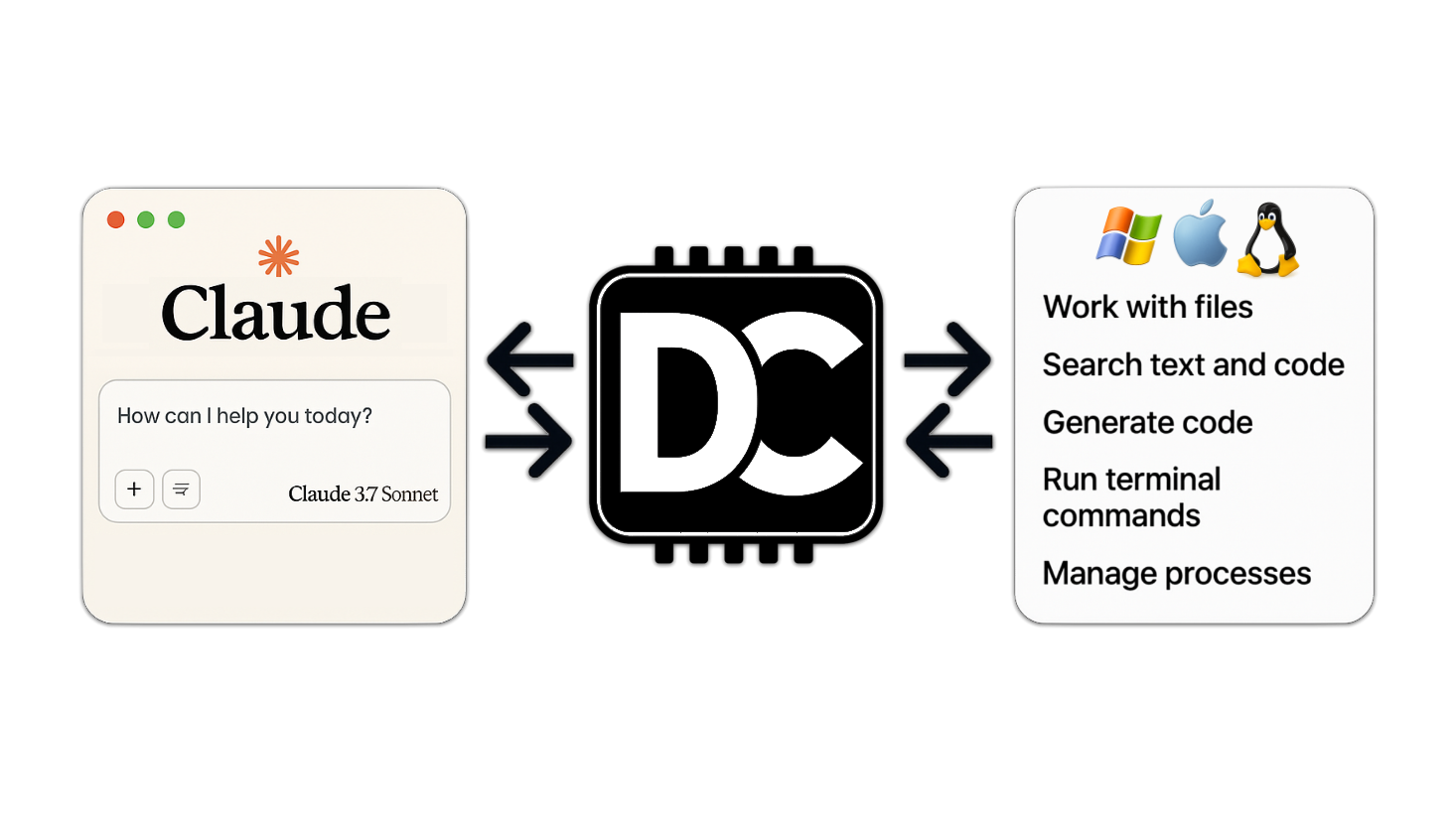
The README's tool table has 25 entries, and for a skill author they sort into a few jobs.
| Skill need | Desktop Commander tool | What to know |
|---|---|---|
| Run a bundled script | start_process | Starts a command or REPL and returns output; the command passes through the blocklist check |
| Answer a prompt the script raises | interact_with_process | Sends input to a running process; open issue #552 reports this path skips the blocklist |
| Read a long log from a script | read_process_output | Pages through output, which suits scripts that run longer than one call |
| Write a generated file | write_file | Default cap of 50 lines per call |
| Make a small change to a file | edit_block | Targeted replacement instead of a full rewrite |
| Find where a pattern occurs | start_search | Streams results from a file or content search |
| Change server settings | set_config_value | Reachable by the model itself, including the safety settings |
Two rows deserve attention before anything else. The last row means that any agent holding the tool can change the very settings that constrain it, including the allowed-directory list and the command blocklist. A skill that reconfigures the server as part of its "setup" step is therefore doing something a reviewer should see explicitly. And the row for interact_with_process is the reason a skill that drives an interactive installer deserves more scrutiny than one that runs a single command.
Skills That Write Files Meet the 50-Line Limit
The server's fileWriteLineLimit defaults to 50. The README frames it as a way to push the model toward smaller chunks, and it is not described as a security control. For a skill author it is a compatibility fact. A skill that says "generate the full migration file" or "write the whole script to disk" may succeed on one runtime and run into a cap on another, and the failure mode is not a clean error in the skill's own logic. The model sees a refusal or a partial write and improvises.
There are three ways to handle it, and the first is the cheapest.
Write skills so that large outputs are built in steps. Instruct the agent to create the file with a first block, then append further blocks, instead of one large call. This works on every runtime and costs nothing.
Ship the generator as a script. If the skill includes generate.sh, the agent runs it with start_process, and the file is written by the script rather than by the write_file tool, so the line cap never applies. This is also easier to test, since the script is deterministic and the model is not in the write path.
Raise the limit, if you control the server. The setting is exposed through configuration. We would not make that the skill's responsibility. A skill that edits server config to suit itself is the pattern described in the previous section, and it should be a human decision made once, not a step an agent repeats.
The read side has a default of 1000 lines per read_file call. A skill that points the agent at a long log or a generated artifact should say which part to read, for example the last 200 lines, so the agent does not page through everything.
An Empty Allow-List Is Not a Fence
The allowedDirectories setting defaults to an empty list, and per the README an empty list grants file operations access to the entire filesystem. Setting it to specific project folders narrows the file tools. It does not narrow the terminal. The README says terminal commands can still reach paths outside the allowed directories, and the project's SECURITY.md says shell substitution, absolute paths or another interpreter can get around the restriction.
This matters for skills in a concrete way. A skill's script is a terminal command. If the skill ships cleanup.sh and that script uses an absolute path or a variable that expands to one, the allow-list is not consulted. A reviewer who reads the skill and sees only relative paths in the SKILL.md prose may conclude the skill stays inside the project, while the script does something else. So when you vet a skill, read the scripts, not just the instructions, and check every path they build.
For skill authors the practical rule is to keep scripts honest about their scope. Resolve paths from a single root variable, refuse to run if the root is outside the expected tree, and print the resolved root first so the log shows what the script thought it was working on. That does not make the runtime safer, but it makes a skill's behavior inspectable, which is what a reviewer needs.
The Blocklist Covers Account and Disk Commands, Not Everyday Tools
The default blocklist has 33 entries, and they target disk formatting, account management, power control, firewall changes and Windows admin tooling. It includes sudo, dd, mkfs, reboot, iptables and reg. It does not include rm, curl, wget, python or bash.
Read that as a statement about what the list is for. It stops a model from formatting a disk by accident. It does not stop a skill's script from deleting a directory, fetching and running remote code, or launching an interpreter that does something the blocklist never saw. A skill that installs dependencies with curl ... | bash runs without complaint. That is not a flaw to report to the maintainers, it is the documented scope.
Two consequences for skill design. First, do not write a skill whose safety depends on the blocklist. If a skill must not delete things, make the script not delete things, and test that. Second, if your skill requires a blocked command, such as a skill that manages firewall rules, say so in its description, because it will fail on a server using defaults and the failure will look like a model error.
Vetting a Skill Before It Gets a Shell
The unit of trust here is the skill, so it is worth treating a skill from an unknown source the way you would treat an unknown script. The registry has security-oriented skills that help with parts of this, and each is described below by what its registry entry says it does. We have not run any of them against Desktop Commander.
Treat the skill's own text as untrusted input
A SKILL.md is content the agent reads and then obeys. If it came from somewhere you do not control, it can contain instructions aimed at the agent rather than the reader. The indirect-prompt-injection skill is built for the reading side of this problem: per its registry description it detects and rejects indirect prompt injection when reading external content such as web pages, documents and emails, and it lists more than 20 detection patterns. A skill that fetches a web page and acts on it, running through a shell server, is exactly the chain SECURITY.md describes, because the server cannot tell an injected instruction from a genuine one.
The clawguard skill describes itself as a security blacklist for AI agents, to be used before executing external commands, visiting unknown URLs or installing new skills. The pattern is worth copying even if you choose a different tool: put a check in front of the step that executes something from outside.
Scan the repository before and after a skill runs
Skills that write files can write secrets into them, and skills that read a working tree can pick them up. The check-secrets skill scans a codebase for leaked API keys, tokens and passwords, and the secrets-gitleaks skill covers secret detection in git repositories with Gitleaks, including pre-commit hooks. Run one before the first agent session and again after a long one. The reason to do this specifically with Desktop Commander is its audit log: the README says claude_tool_call.log records every call's arguments and that they are not redacted or sanitized. A token that appears in a command line is on disk in plain text, so a scan of your home directory logs folder belongs in the routine too.
Read the scripts, not just the description
A short manual review catches more than any scanner. For each script in a skill, check what it deletes, what it downloads, what it writes outside the project, whether it calls sudo, and whether it modifies shell startup files. Compare that list to what the SKILL.md says the skill does. A mismatch is the finding.
Running Skill Workflows in a Container
SECURITY.md lists Docker or virtual machine isolation as the boundary, and says the in-process settings are not one. For a skill that runs scripts, the container is where the decision actually gets enforced.
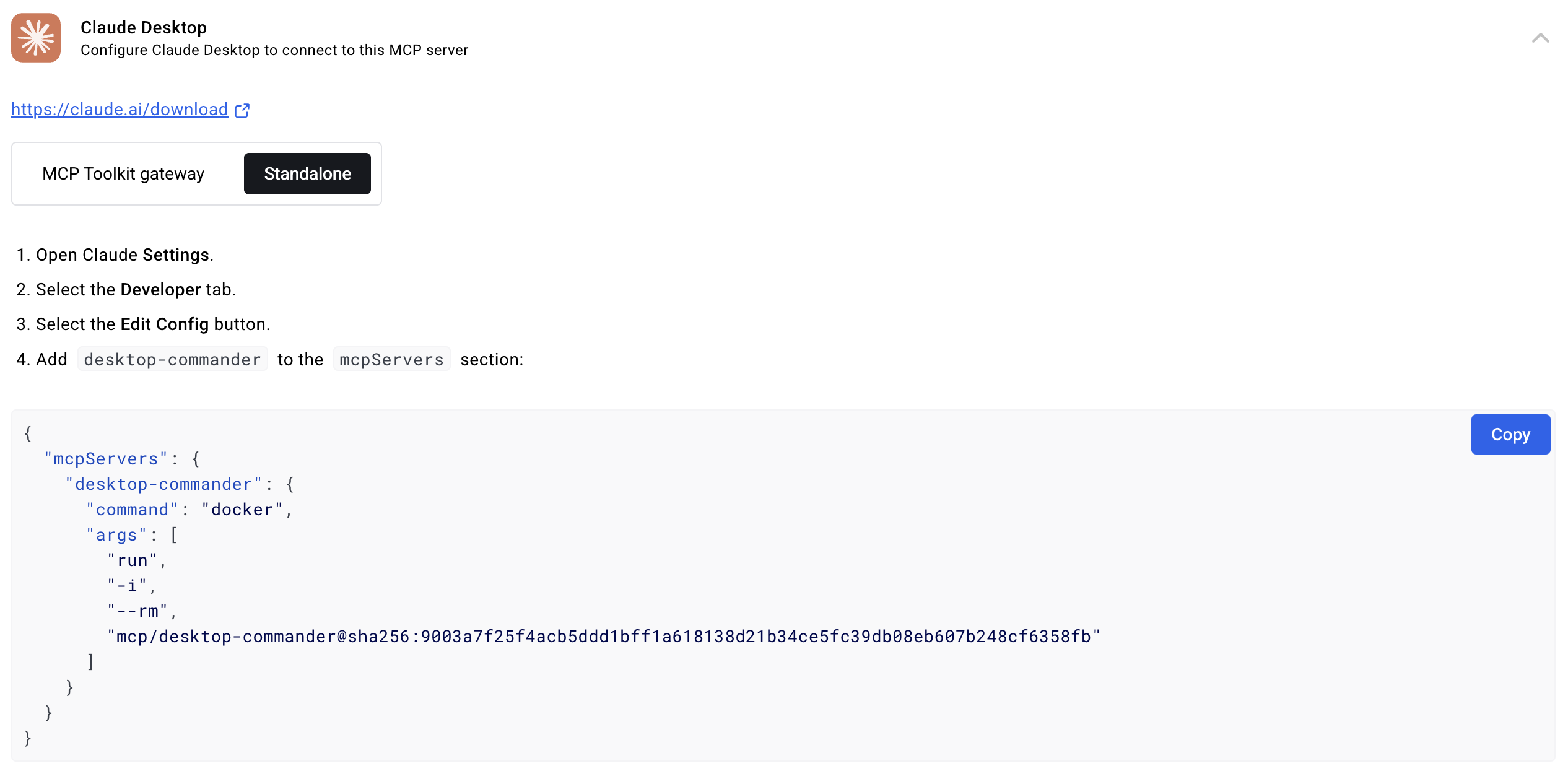
The README's basic Docker entry for the server has no mounts, so the container sees none of your files:
{
  "mcpServers": {
    "desktop-commander-in-docker": {
      "command": "docker",
      "args": ["run", "-i", "--rm", "mcp/desktop-commander:latest"]
    }
  }
}
To let a skill work on a project, add a -v mount for that one directory. The README shows the form with -v flags that map host folders to paths under /mnt. For skill work, three habits follow from how containers behave. Mount only the project the skill should change. Mount it read-only when the skill only analyzes, which is common for review and audit skills. Put no credentials in the container's environment, so a skill that echoes its environment has nothing sensitive to echo.
The agent-sandbox skill in the registry is terse, with a description that only says to invoke it as $agent-sandbox, so we are not describing its behavior. It is listed here as a pointer for readers who build sandbox tooling: check its source before you decide whether it fits.
Containers also help with the scripts you write. The bash-defensive-patterns skill covers defensive Bash for production scripts. A skill's bundled scripts benefit from the usual habits, such as failing on unset variables and quoting expansions, because a script run through a shell server executes whatever its arguments expand to. Careful scripting limits what a misread instruction can do, even inside a container.
Remote Jobs From a Phone
Remote mode extends the same toolset on your machine to web-hosted clients such as ChatGPT and Claude's web app. The command is npx @wonderwhy-er/desktop-commander@latest remote, which starts an OAuth device-authorization flow, then you connect the AI client at mcp.desktopcommander.app. The project's posts say the machine must be on and online, and that Claude access works from anywhere you are signed in, including a phone.
For skill workflows, the useful pattern is a long-running job that you start and check on. A skill that kicks off a build, a data export or a backup script fits it: the script runs on your machine, and read_process_output lets the agent report progress. The caveats are specific. Per the project's README, calls pass through a hosted service that stores tool arguments and results temporarily, with terminal entries that may be purged after a minute, with an hour as the outer limit, so a skill should never take a secret as a command-line argument. Pass credentials through the environment of the machine instead. And since the remote path depends on a hosted service, a skill that must finish should write its results to disk and not rely on the session staying connected. The project replied to one 20-minute outage on October 5, 2026, and we found no published uptime figure.
The pairing is a credential. The paired session lives in ~/.desktop-commander-device/device.json, remote --logout removes it from the machine but leaves the server-side authorization, and revoking the device in the dashboard is what actually ends access. If you hand a machine to someone else or retire it, do the revoke.
Subagents and Shared Configuration
Skills often run inside subagents, which are separate agent contexts the main agent delegates to. We did not find documentation of how Desktop Commander behaves when several agents share one server, so this part is inference, labeled as such. If two agents are connected to the same server instance, they see the same configuration, and either can call set_config_value. That means a restriction you set for the main agent is not a restriction on a subagent that has the same tools. If you rely on a narrowed directory list, apply the narrowing at a layer the subagent cannot edit, such as the container's mounts.
Claude Code's permission documentation gives a way to constrain which tools a session can call. Per that page, denying mcp__* drops every MCP tool, while an allow rule may use a wildcard only after a fixed mcp__<server>__ prefix, as in mcp__puppeteer__*. By that pattern, a server registered as desktop-commander would expose names like mcp__desktop-commander__start_process. That naming is our reading of a documented pattern, so confirm it in your own client. The companion permission-modes page says bypassPermissions turns prompts off and belongs only inside isolated setups, meaning containers or VMs. If a skill workflow runs unattended in that mode, the container is not optional.
The OpenAI dots permissions guide covers the same design question on the OpenAI side: which steps an agent may take without asking and which it must hand back. The Codex Security Cloud write-up is a useful comparison for how a vendor describes validation inside a sandbox. Neither covers Desktop Commander, and we do not claim the models are equivalent.
The Record Skill Authors Should Know About
Two facts from the security record change how much trust a long-running skill setup deserves. CVE-2025-11491 is a command injection flaw in the CommandManager function (file src/command-manager.ts) that reaches versions through 0.2.13. The National Vulnerability Database scores it 9.8 and the CNA, VulDB, scores it 6.3 under the same CVSS 3.1 system, and the record does not name a fixed version. The current npm release is 0.3.1, published October 22, 2026, and it requires Node 22.12.0 or newer, which 0.3.0 introduced.
Three open issues, #933, #552 and #411, report ways around the allow-list and blocklist. We did not reproduce them. Issue #933 says a newline is not treated as a command separator, and our static read of the separator list on the main branch matches that. Issue #552 says input sent with interact_with_process is not validated, and in the file we read the validator call appears in the start-process path only. Validation may happen elsewhere, so treat this as a pointer. The skill-author reading is simple: a blocklist is a seatbelt, and a skill whose safety depends on it needs a different design.
For update policy, note that the install routes in the README that name @latest pull whatever version is newest each time the client restarts. That is convenient, and it also means the code holding a shell on your machine can change between sessions. A team that reviews its skills should consider pinning the version it reviewed.
A Pre-Flight Checklist
This is the checklist we would use before running a third-party skill through Desktop Commander. It is built from the sources above, and none of it has been tested by us.
- Decide the runtime first. If the skill reads untrusted content or comes from an unknown author, run the server in a container with narrow mounts and no secrets.
- Read every script the skill ships, and compare what it touches with what SKILL.md claims.
- Search the skill for calls to
set_config_value, edits to config files and changes to shell startup files. Treat each as a finding. - Check whether it needs a blocked command or a file larger than 50 lines, and whether the skill says how it handles both.
- Keep secrets out of arguments and prompt text, since the local log keeps arguments as typed and the remote service holds them for a while.
- Add client-side permission rules that ask before
start_process,interact_with_processandset_config_value. - Run a secret scan before and after the first real session.
- Pin the server version you reviewed, and read the release notes before you update.
- For remote use, log out and revoke the device when you finish with a machine.
What We Could Not Verify
No skill in this article was run against Desktop Commander by us, so behaviors like how a given script interacts with the line cap are reasoned from the documented defaults. We did not confirm the exact permission-rule names for this server in any client. We did not audit the remote service, its retention claims or its telemetry statements, all of which are vendor descriptions. The remote-device README names Node.js 18 as a prerequisite, but npm metadata asks for 22.12.0 or newer starting with 0.3.0, and we did not determine which applies to the remote command. We could not find Remote MCP pricing or an independent security audit. The registry descriptions for the security skills are descriptions, and we have not evaluated how well they work. Counts like stars, downloads and open issues change daily, and we omit them here for that reason.
Frequently Asked Questions
Can a skill run without Desktop Commander?
Yes. Skills that are pure instructions need no runtime beyond a model that reads them, and clients with their own shell tools can run bundled scripts directly. Desktop Commander matters when your client has no shell of its own or when you want its interactive process sessions.
Will a skill that writes a long file work through Desktop Commander?
Possibly not in one call. The default write cap is 50 lines per call, so a skill should build large files in steps or generate them with a script it runs.
Does the allowed-directories setting contain a skill's scripts?
No. It restricts the file tools. Terminal commands, which include anything a skill's script does, can still reach other paths.
Does the default blocklist stop a skill from deleting files?
No. Its 33 entries cover disk, account, power, firewall and Windows admin commands, and rm is not among them. Design the skill so it does not delete what it should not.
How should I run an untrusted skill?
In a container or virtual machine, with narrow mounts and no secrets in the environment. The project's own policy names that as its isolation boundary.
Can a subagent change the server's safety settings?
If it holds the set_config_value tool it can, as far as we can tell from the tool table. We could not find documentation about multi-agent behavior, so apply restrictions where the agent cannot edit them, such as container mounts or client permission rules.
Where do secrets end up when I run a skill remotely?
The README says the hosted service stores tool arguments and results temporarily, and the local log stores arguments without redaction. Pass credentials through the machine's environment, not through commands or prompts.
Sources
Checked October 29, 2026.
- Desktop Commander repository and README: https://github.com/wonderwhy-er/DesktopCommanderMCP
- SECURITY.md: https://github.com/wonderwhy-er/DesktopCommanderMCP/blob/main/SECURITY.md
- Remote device README: https://github.com/wonderwhy-er/DesktopCommanderMCP/blob/main/src/remote-device/README.md
- Configuration source: https://github.com/wonderwhy-er/DesktopCommanderMCP/blob/main/src/config-manager.ts
- Command parser source: https://github.com/wonderwhy-er/DesktopCommanderMCP/blob/main/src/command-manager.ts
- Process tools source: https://github.com/wonderwhy-er/DesktopCommanderMCP/blob/main/src/tools/improved-process-tools.ts
- Open issues: #933, #552 and #411
- npm registry metadata: https://registry.npmjs.org/@wonderwhy-er/desktop-commander
- NVD record: https://nvd.nist.gov/vuln/detail/CVE-2025-11491
- Remote service: https://mcp.desktopcommander.app
- MCP security best practices: https://modelcontextprotocol.io/docs/tutorials/security/security_best_practices
- Claude Code permissions and permission modes
- First-party posts: https://x.com/desktopcommandr/status/2102449093867909508 and https://x.com/desktopcommandr/status/2103160029805215991
- Registry skills: indirect-prompt-injection, clawguard, check-secrets, secrets-gitleaks, agent-sandbox, bash-defensive-patterns
- Image: Desktop Commander README Docker section, screenshots/docker-config.png in the repository above
Next step
Ready to upgrade your agent?
Browse the open registry of agent skills for Claude Code, Codex, GitHub Copilot, and Antigravity. Every skill installs with one command.
