Codex Security Cloud: the four-stage pipeline and its limits
How Codex Security Cloud scans GitHub repos: the threat model, validation sandbox, remediation flow, and the limits OpenAI states itself.
Agent Skills

Codex Security Cloud is an OpenAI application-security agent that scans connected GitHub repositories, validates likely vulnerabilities, and returns findings with evidence and remediation guidance. It is a plugin for Codex cloud, available on the web and in the desktop app, and the September 29, 2026 DevDay upgrade added two things that change how teams can use it: continuous review of new commits, and access to cyber-capable models offered through Daybreak Blue included by default without a separate Daybreak Blue application.
The single most important line in OpenAI's own documentation is a limit, not a feature: Codex Security complements SAST and does not replace it, and it does not replace manual security review. The second most important line is a maturity caveat: the documentation calls Codex Security Cloud a research preview, while the DevDay recap lists it as available to Pro, Business, Enterprise, and Edu on desktop and web. Both statements come from OpenAI. This guide takes the stricter reading wherever they diverge, and says where.
What Codex Security Cloud Is, and What It Is Not
OpenAI ships three related but distinct things, and conflating them is the most common source of confusion about this release.
Codex Security Cloud is the plugin this article is about. It scans connected GitHub repositories in Codex cloud, runs on the web and in the desktop app, and supports both one-off repository scans and continuous monitoring of new commits.
The Codex Security plugin is a different plugin for local work. It scans a local repository inside a Codex task, in the desktop app or the CLI, and it is the one that produces the workbench with Scans, Findings, and Repositories views. OpenAI's documentation states the two are not the same plugin.
The CLI and TypeScript SDK ship as the public @openai/codex-security package. The CLI discovers GitHub repositories, resumes bulk scans, tracks findings across scans, records false-positive feedback, and runs checks in CI or before commits, with SARIF upload and a severity policy available. The SDK lets you build scanning, progress reporting, and cost controls into your own tool.
For the cloud product, the required inputs are narrow and worth listing before anything else: a workspace with Codex Security Cloud access, a connected GitHub repository, and a compatible Codex cloud environment. Those last two can be set up during the first scan.
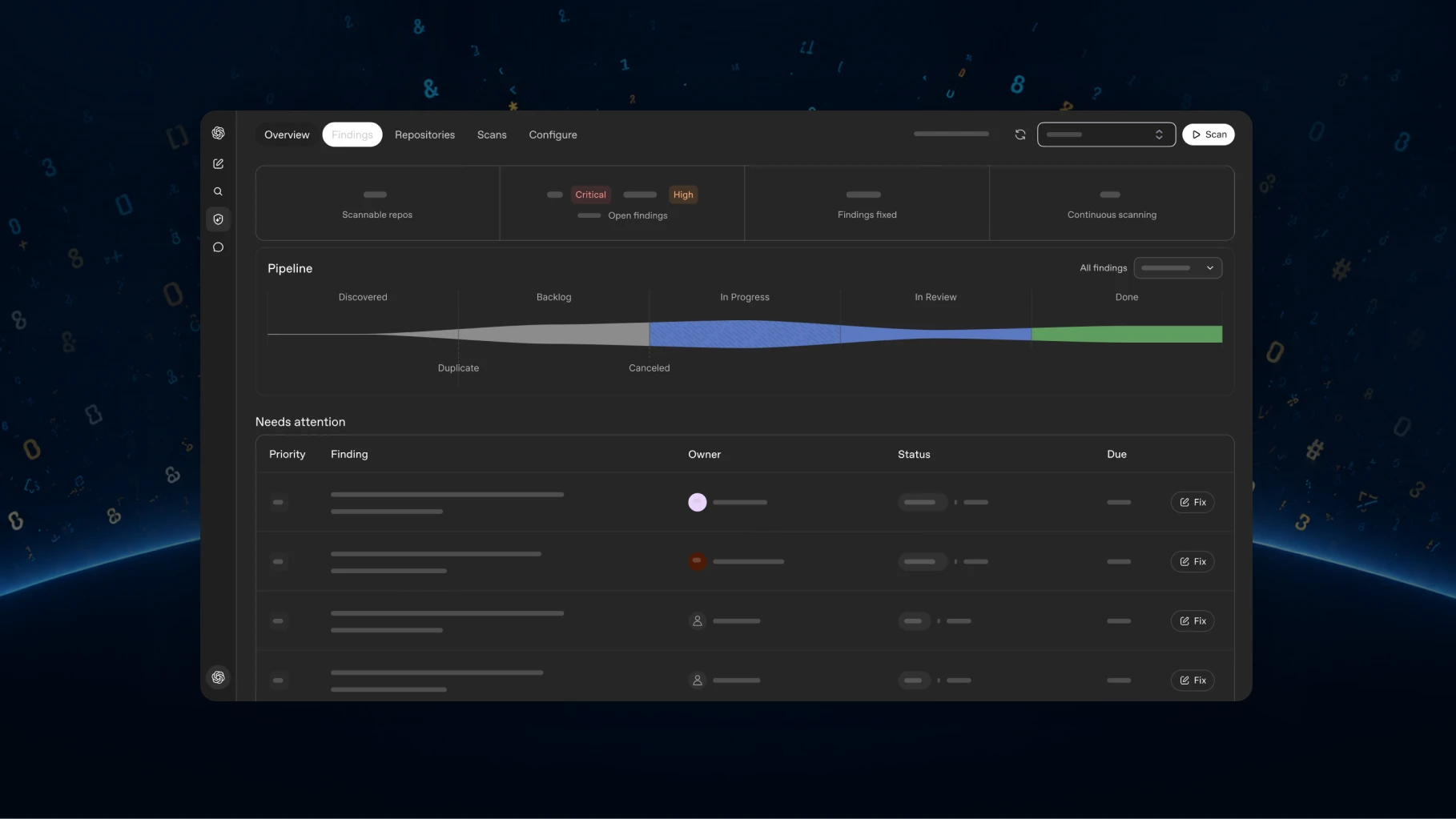
The Four-Stage Pipeline
OpenAI describes the analysis pipeline in four named stages. Knowing which stage produced a result matters, because the stages have different failure modes.
| Stage | What it does | What it produces | Where it can fail |
|---|---|---|---|
| 1. Analysis | Builds a threat model for the repository: a short summary of how the code works, its entry points and untrusted inputs, trust boundaries and auth assumptions, sensitive data paths, and the areas your team wants reviewed first | The scan-time security context that guides everything downstream | A wrong or stale threat model misdirects the whole scan; it is generated from code and is editable for exactly this reason |
| 2. Scanning | Reviews the repository once, or monitors commit changes for likely issues | Candidate findings | Coverage is not guaranteed; OpenAI describes performance as dependent on the model's reasoning ability for the language and framework in use |
| 3. Validation | Tries to reproduce each likely issue in an isolated container | Validated or unvalidated status, plus logs, commands, and artifacts as evidence | Validation may fail, and the finding stays unvalidated; the logs still capture what was attempted |
| 4. Remediation | Provides guidance and, where available, a proposed patch to review before opening a pull request | Ranked findings with criticality, remediation guidance, and a proposed minimal diff with filename and line context | Patches are proposals; nothing is applied or pushed automatically |
The deduplication OpenAI advertises happens across stages two and three. The mechanism is worth stating precisely, because "deduplicates findings" sounds more clever than it is: the model first ranks likely issues, then auto-validation tries to reproduce each one in a clean container, and findings that successfully reproduce are marked as validated. That two-stage structure is designed to reduce false positives before a human reads them, not to prove that a finding is exploitable in your environment.
Setting It Up
The setup path OpenAI documents is short enough to reproduce here in full.
- Open Plugins in ChatGPT on the web or in the desktop app, search the marketplace for Codex Security Cloud, install and enable it, then open Security Cloud from your installed plugins or sidebar. If access is unavailable, the documentation says to check with your workspace administrator.
- Confirm Codex cloud is set up for the workspace. In the plugin, select New scan. If prompted, select Connect GitHub and grant access to the repositories you want scanned. A repository missing from the list means its GitHub connection or permissions need checking.
- Start a repository scan: choose the repository, select a compatible Cloud environment or select Create environment to configure one, leave What to scan on Repository (the default), and select Start scan.
- Open the scan in Scans to follow progress, then open Findings and select an issue to review affected code, validation evidence, and remediation guidance. When a finding offers Fix with Codex, select it to generate a proposed patch, review the patch, and only then select Create draft pull request.
Continuous monitoring is a separate mode: New scan, choose the repository and cloud environment, set What to scan to Commit changes, and select Create. From there, Repositories → Monitoring settings is where you change the cloud environment, choose how many days of history to review, and pause or enable monitoring. Saving applies the change.
The documentation notes that the cloud environment can be created during scan setup rather than prepared in advance, which removes the most common reason a first scan stalls.
The Threat Model Is the Part You Own
If there is one operational habit to take from this release, it is editing the threat model. It is also the step most likely to be skipped, because the first generated version looks adequate.
OpenAI's own description of a useful threat model names four things: entry points and untrusted inputs, trust boundaries and auth assumptions, sensitive data paths and privileged actions, and the areas the team wants reviewed first. The documentation includes a worked example for a service that exposes a public API for account changes, accepts JSON requests and file uploads, checks identity through an internal auth service, and writes billing changes through an internal service. The example's instruction is the operative part: focus review on auth checks, upload parsing, and service-to-service trust boundaries.
That example is the whole case for editing. Without it, a scanner has to guess which of a hundred code paths your team considers load-bearing. With it, the scan prioritises what you named. The editing path is Repositories → select the monitored repository → Monitoring settings → Project context → edit Threat model → Save, and changes apply to future scans.
Two properties of the threat model are worth internalising. It is generated from the repository's code, so it summarises architecture and security entry points rather than business context — business context is yours to add. And it is used to guide future commit scans and prioritise findings, which means a stale threat model does not just misdirect a scan; it continues to misdirect every scan after it.
How Customer Code Is Isolated
The isolation model is the part a security team will ask about first, and OpenAI's answer is specific.
Each analysis and validation job runs in an ephemeral Codex container with session-scoped tools. Artifacts are extracted for review, and the container is torn down once the job completes. The target repository is temporarily cloned for analysis. Validation runs commands or tests inside the sandbox and attaches the results as evidence.
No compile step is required for the scanner to produce findings from repository and commit context. During auto-validation, however, it may try to build the project inside the container if that helps reproduce the issue — which means the environment needs to be capable of building your project for the validation stage to work well.
An important limitation follows from this design. Because validation depends on reproducing an issue in a container, findings in code that requires live services, specific data states, or unusual network access may stay unvalidated. OpenAI states what happens then: the finding remains unvalidated, and the logs and reports capture what was attempted so an engineer can retry or adjust the reproduction steps. An unvalidated finding is not a false positive, and it is not a confirmed vulnerability either.
What the Scan Produces
Completed scans produce both a human-readable entry point and machine-readable data, which is what makes the output usable in a pipeline rather than only in a UI.
report.md— the primary readable entry point to the scan results.findings/<slug>/— detailed vulnerability reports and supporting proof-of-concept files, when available.hardening/— structural hardening guidance with supporting proposals or diagrams, when available.scan-manifest.json,findings.json, andcoverage.json— structured scan data for automation and integrations.
OpenAI's advice to keep the full scan directory together when sharing or archiving results is practical rather than cosmetic: the links inside report.md point at sibling files, so a lone report.md is a broken document.
The remediation artefacts are equally specific. A proposed patch contains a minimal actionable diff with filename and line context when a remediation can be generated for the finding. The workflow generates a diff, patch file, or suggested change for maintainers and reviewers to inspect before applying, and it does not directly modify your pull-request branch.
Where OpenAI Says It Stops
Three limits appear in OpenAI's own documentation, stated plainly, and they should be the first thing you read before promising anything to a security team.
It is not a SAST replacement. Codex Security complements SAST. It adds semantic, model-based reasoning and automated validation, while existing SAST tools still provide broad deterministic coverage. That sentence is close to the exact division of labour: deterministic tools for breadth and known-rule coverage, a reasoning agent for the classes of bug that rules do not express, and validation to filter noise.
It is not a replacement for manual review. It accelerates review and helps rank findings, but it does not replace code-level validation, exploitability checks, or human threat assessment.
Coverage depends on the language and framework. Codex Security is language-agnostic in design, but OpenAI states plainly that in practice performance depends on the model's reasoning ability for the language and framework used by the repository. A monorepo with an unusual stack is therefore a different proposition from a mainstream one, and the honest planning assumption is that coverage varies by repository rather than being uniform.
There is also an access prerequisite for anyone planning a pilot: running scans requires Codex Security access, and OpenAI recommends an account verified for its cyber program for best results. If access is unavailable, the documented path is to check with your workspace administrator rather than to assume the feature is broken.
How These Claims Grade
Because the product is in research preview, the honest split is between what OpenAI documents as designed behaviour and what is measurable today. The table below makes that split explicit.
| Claim | Grade | Evidence and the fine print |
|---|---|---|
| Codex Security Cloud scans connected GitHub repositories and monitors new commits | Verified against product documentation | Setup and monitoring paths are documented step by step; both Repository and Commit changes modes are described |
| Four-stage pipeline: analysis, scanning, validation, remediation | Vendor-stated | Named and described in OpenAI's own FAQ; no independent reconstruction |
| Validation reduces false positives by reproducing issues in a sandbox | Vendor-stated | Mechanism is described; no published false-positive rate before or after validation |
| Each job runs in an ephemeral container that is torn down afterwards | Vendor-stated, design-level | Described in the FAQ; not independently verifiable from outside |
| Proposed patches are reviewed before any pull request is created | Verified against documentation | The workflow generates a diff or patch and never modifies the pull-request branch directly |
| It complements SAST rather than replacing it | Vendor-stated | OpenAI's own scope statement; it is the conservative reading and should be quoted to stakeholders |
| It does not replace manual security review | Vendor-stated | OpenAI's own scope statement |
| Coverage varies with language and framework | Vendor-stated | "Language-agnostic" in design, with performance dependent on model reasoning ability |
| Available to Pro, Business, Enterprise, and Edu | Verified in the DevDay recap | Contradicted in maturity terms by the docs calling it a research preview; both are stated |
| Daybreak Blue cyber-capable models are included by default | Verified in the recap and the launch post | No standalone Daybreak Blue page or model inventory is published |
| Accuracy, recall, or false-positive rate | Not published | Absent from every first-party source checked; no independent evaluation exists in the source set |
The last row is the reason the pilot plan below exists. A security tool without a published accuracy figure should be evaluated on your own repositories before it is trusted on your whole codebase.
How This Changes a Security-Skill Workflow
If you maintain agent skills for security work, this release shifts where human effort goes rather than removing it. Three changes are worth planning for.
Triage becomes the bottleneck. A scanner that produces ranked, validated-or-unvalidated findings with evidence moves the hard work from finding bugs to deciding which ones matter. The registry entries built for that judgement are security-best-practices for the code-level rules that a scanner will keep re-reporting until they are fixed in the codebase, and threat-mitigation-mapping for the mapping step you now maintain by hand in Monitoring settings.
Your threat model becomes a maintained artefact. It is not a scan setting; it is documentation with operational consequences. If your team already writes architecture decision records, the threat model is the security sibling of that practice, and it needs an owner.
Validation changes the review contract. A finding marked validated has reproduction evidence attached. A finding that is unvalidated has logs of what was attempted. Those are different review tasks, and a workflow that treats them the same will either over-trust or over-dismiss the output. The registry entry for reviewing changes with that context is differential-review, and api-security-best-practices is the relevant page for the service-to-service trust boundaries a threat model should name.
For scanning a backlog of dependency findings alongside repository scans, the closest registry analogues are the tool-replacement collections snyk and dependabot. The broader set of security skills lives under the Security category and the security-audit tag.
A Pilot Plan That Produces a Number
The published material contains no accuracy figure for Codex Security Cloud, and no independent evaluation exists in the source set. That absence is the reason to run a pilot rather than adopt on faith, and the pilot is cheap because the tool is a plugin rather than an integration project.
Pick two repositories with known history. One should have a recent security fix you already shipped, so you can check whether the scanner would have found it. The other should be a repository where you believe the code is clean, so you can measure noise.
Edit the threat model before the first scan. Scan, then compare the findings against your known fix. A scanner that misses a bug you have already fixed tells you more about the tool than a hundred findings of unknown merit.
Separate validated from unvalidated findings on the first pass. Count them separately and resist the temptation to average them. The validated set is what the tool will stand behind; the unvalidated set is a queue for human judgement.
Measure the validated-finding rate, not the finding count. The useful ratio is validated findings that your engineers agree are real, divided by validated findings. Anything else rewards the scanner for verbosity.
Pilot on two repositories and stop. Broadening before you have the ratio means multiplying an unknown error rate by your whole codebase. Widen only after the per-repository number is stable and you have decided who triages the queue.
Availability, Plans, and the Daybreak Blue Question
The availability line from DevDay is that Codex Security Cloud is available to Pro, Business, Enterprise, and Edu on desktop and web. The product documentation describes it as available in research preview on the web and in the desktop app. The DevDay post adds the operational claim that it works when your laptop is closed, which is a consequence of running in Codex cloud rather than locally.
Daybreak Blue is the part of this release with the least public detail. OpenAI states that access to cyber-capable models offered through Daybreak Blue is included by default, without a separate Daybreak Blue application. As of the access date, OpenAI had published no standalone Daybreak Blue page or model inventory, so there is no way to state which models are involved or what their capability profile is. Any summary that names Daybreak Blue models is inferring beyond the published material.
The two descriptions of maturity are not in direct conflict, and reading them together is more useful than picking one. "Research preview" describes where OpenAI places the product in its own release process; the plan list describes who can reach it. A team planning a pilot should take the preview label as the governing statement about stability and change frequency, and the plan list as the practical availability check. That combination means the feature is reachable on those plans and the interface, pipeline, or output format may still move without a deprecation cycle — which is an argument for keeping the threat model and any automation thin rather than building a pipeline that depends on a JSON field surviving.
The practical conclusion from both facts is the same: treat this as a supervised pilot on repositories you own, with a named owner for the threat model and a triage queue with an owner too. The tool does real work, and the work it displaces is the work you should already have been doing.
Two sibling articles give the surrounding context. The DevDay 2026 roundup for agent builders covers the other six Codex and API items announced the same day, and GPT-6.1 Sol for coding agents covers the model economics that decide whether a validation-heavy pipeline is affordable to run on a schedule. If the phrase "security skill" is unfamiliar, What Are Agent Skills? explains how these workflows are packaged.
FAQ
Is Codex Security Cloud the same as Codex Security? No. Codex Security Cloud scans connected GitHub repositories in Codex cloud and is the subject of this guide. The Codex Security plugin runs local scans in a Codex task, in the desktop app or the CLI.
Does it replace my SAST tooling? No. OpenAI states it complements SAST, adding semantic model-based reasoning and automated validation while SAST continues to provide broad deterministic coverage.
Does it replace manual security review? No. The documentation is explicit that it accelerates review and helps rank findings, but does not replace code-level validation, exploitability checks, or human threat assessment.
Does it apply fixes automatically? No. A finding may include a proposed minimal patch, which you review before selecting Create draft pull request. The workflow generates a diff or patch for inspection and does not modify your pull-request branch directly.
Can I scan a repository without a build step? Findings can be produced from repository and commit context without a compile step. During auto-validation the tool may still try to build the project inside the container if that helps reproduce an issue, so a buildable environment improves validation quality.
What happens when validation fails? The finding stays unvalidated, and the logs and reports capture what was attempted. You can retry, investigate further, or adjust the reproduction steps.
Which plans include it? The DevDay recap lists Pro, Business, Enterprise, and Edu on desktop and web. The product documentation describes it as a research preview. Access can also require workspace-level enablement, so the documentation's advice to check with your workspace administrator is the practical first step.
What is Daybreak Blue? OpenAI states that Codex Security Cloud includes access to cyber-capable models offered through Daybreak Blue by default, without a separate Daybreak Blue application. No standalone Daybreak Blue page or model list has been published, so the specific models are not publicly enumerated.
Sources
Checked September 29, 2026.
OpenAI — primary
- Codex Security (product overview) — pipeline, three surfaces, isolation, access prerequisites
- Codex Security Cloud setup — install, connect GitHub, first scan, findings, commit monitoring
- Codex Security Cloud FAQ — pipeline stages, isolation, validation behaviour, SAST and manual-review limits
- Improving the threat model — what a threat model contains and how to edit it
- Codex Security plugin quickstart — the local plugin, and its separation from the Cloud plugin
- Codex cloud — the environment prerequisite
- DevDay 2026 Recap — availability line and official dashboard image
- @OpenAI on X — the Codex Security Cloud upgrade post embedded above
- @OpenAIDevs on X — developer-facing detail
@openai/codex-security— the public CLI and TypeScript SDK package
Next step
Ready to upgrade your agent?
Browse the open registry of agent skills for Claude Code, Codex, GitHub Copilot, and Antigravity. Every skill installs with one command.


