OpenAI dots: the permission model and what to hand off
How OpenAI dots work: Auto-review, Custom Rules, read-only background research, the steps a dot hands back, and what to delegate.
Agent Skills

A dot is an always-on agent that runs on its own cloud computer, connects to the apps you authorise, and keeps working between conversations. It is powered by GPT-6 Astra, it can reach more than 4,000 apps through OpenAI's plugin ecosystem, and it is reachable in ChatGPT on desktop, web, and mobile plus Slack and Teams, with texting described as coming soon. Rolling out to Pro and Business Premium in eligible markets, with Enterprise, Edu, and Healthcare able to try the beta once a workspace admin enables it.
The interesting part of dots is not the capability list. It is the permission architecture, because that is the part you would otherwise have to invent yourself and because it is the closest thing OpenAI has shipped to a reference design for an agent that acts on its own. This guide walks the model end to end: the cloud workspace, Auto-review, Custom Rules, the read-only boundary on background work, and the steps a dot hands back instead of completing.
One honest caveat before the detail. OpenAI has published no capability benchmark for dots. There is no task-completion score, no success rate, no latency figure, and no failure-rate measurement in the launch material, and there is no third-party evaluation in the source set. Every statement below about what a dot can do is therefore a statement about designed behaviour, not a measured one. Where that distinction matters, it is called out.
What a dot Can Do on Its Own
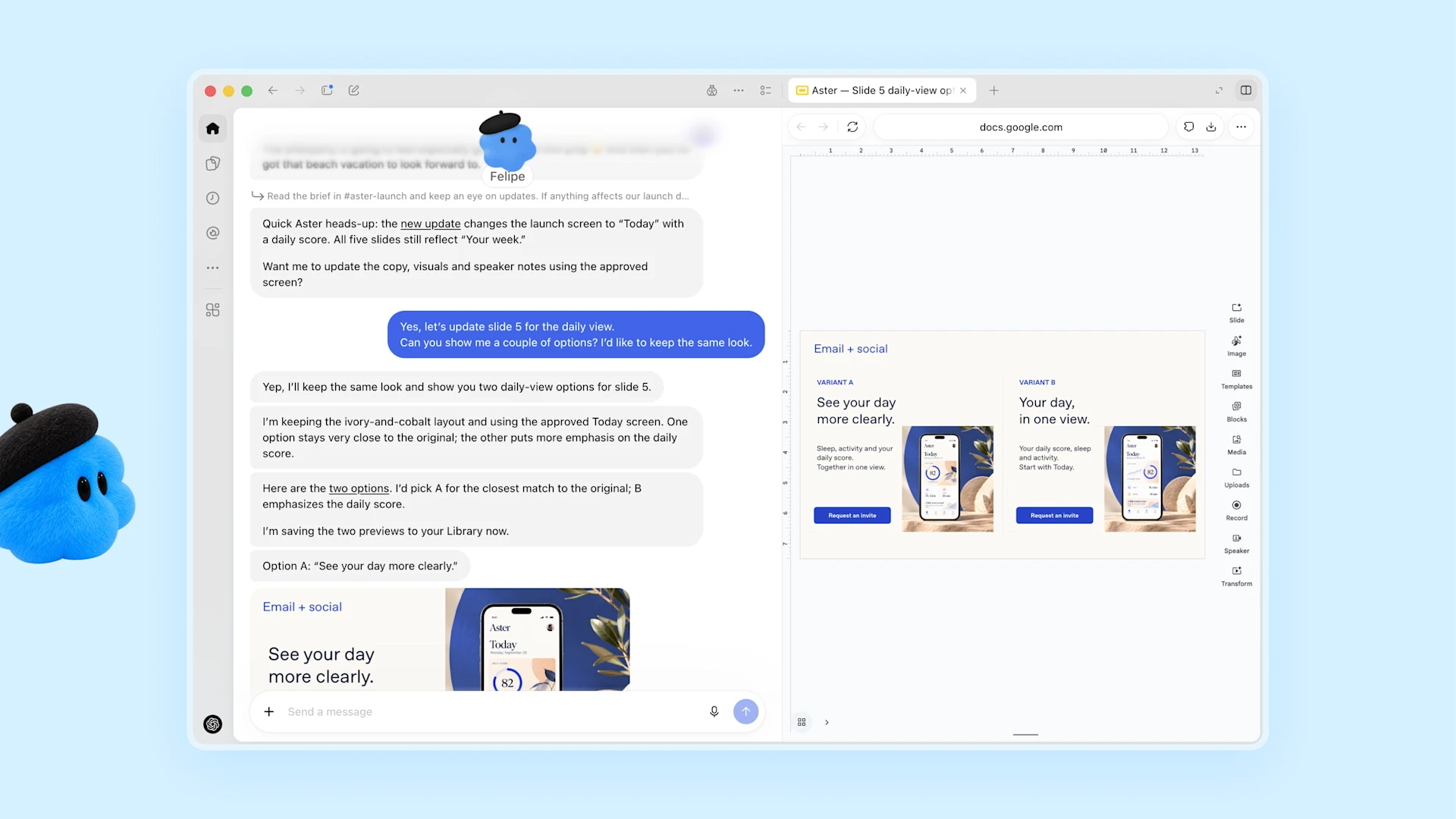
The launch page is specific about the execution surface. A dot can do nearly anything using its own cloud computer, its own browser, and the apps you have connected. You can open that computer at any time to inspect its work. Beyond its own environment, a dot can connect to other devices, and you can give it permission to connect to and use your laptop, where it works alongside you directly.
The operating pattern is a project rather than a question. You hand a dot a project and it runs with it, including while it is working on several others, and you can keep adding tasks and ideas without managing a separate thread for each or directing every step. That is a different contract from a chat: the unit of work is an ongoing responsibility, not a turn.
The launch material also describes a voice channel: you can message or call a dot, ask questions, explore ideas, and give feedback as work proceeds. Feedback accumulates, and OpenAI states the dot learns your preferences, how you think, and what good looks like to you over time.
The Permission Model, Layer by Layer
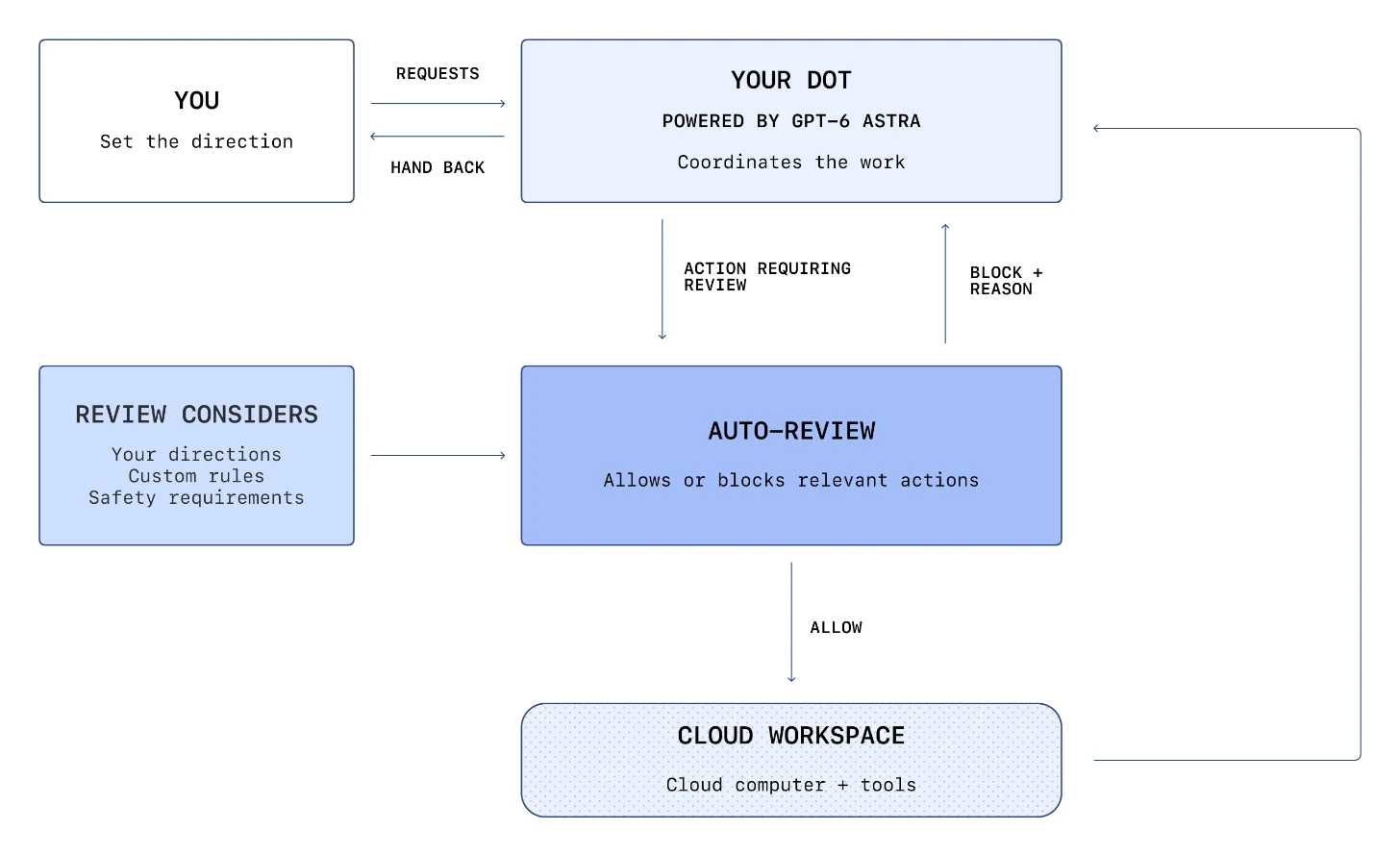
OpenAI states that dots build on ChatGPT's protections with additional safeguards, and the model has four distinct layers. Understanding which layer does what is the difference between a workable deployment and an agent you cannot reason about.
Layer one: app permissions. You choose which apps a dot can access, and you manage that through the existing ChatGPT app controls. Those connections and permissions are shared across ChatGPT, ChatGPT Work, and Codex. In the Plugins section of Settings you can review connected accounts and change what dots can access going forward. Disconnecting an app stops new information sharing through that connection, but information a dot has already learned remains in its own context. Permissions govern access to your apps; they do not override mandatory safety requirements.
Layer two: built-in action rules. Dots start with built-in rules for when to act independently and when to ask for approval. OpenAI describes the rule shape in detail. Reads and analysis are free: dots can read information they have permission to access, analyse it, and prepare drafts inside your conversations. Sending a message or sharing a file requires authorisation that covers both the information and the type of recipient, and more sensitive data requires more specificity. The worked example in OpenAI's safety write-up is health data, which always requires a named recipient, whereas less sensitive personal data such as an email address or phone number defaults to requiring a class of recipients, with the user able to broaden that further through a Custom Rule. That authorisation stays tied to the task: continuing later or delegating the work does not expand it.
Layer three: confirmations and handoffs. Some actions are always confirmed rather than merely gated. OpenAI names permanently deleting data, installing or running software from an unrecognised source, and granting new security-sensitive access — cases chosen because they are hard to undo or they grant someone new access. A second category is handed back entirely: changing a password, or transferring money between financial accounts, are tasks where a dot can help with the surrounding work but must hand the sensitive step to you. Purchases using cards already saved with a merchant are possible but require your approval every time.
Layer four: Custom Rules. Custom Rules let you shape how a dot helps within the built-in protections — telling it never to send emails, for example, or giving task-specific direction such as asking it to tell a colleague you are away without sharing the personal reason. Those instructions persist when the dot delegates work or operates in the background. A dot can help you write Custom Rules, but changing them requires your approval, and no Custom Rule can remove mandatory confirmations, handoffs, or core safety requirements.
Laid out as a boundary table, the model reads like this:
| Action | Gate | Who completes it |
|---|---|---|
| Read permitted data, analyse it, prepare drafts in-conversation | App permissions and tool restrictions only | The dot |
| Browse, create files, run code in its own cloud workspace | Sandboxing inside the workspace | The dot |
| Send a message or share a file | Auto-review, checked against directions, Custom Rules, and safety requirements. Authorisation must cover the information and the recipient class | The dot, after the gate allows it |
| Purchase with a card already saved with a merchant | Auto-review plus your explicit approval | The dot, after your approval |
| Permanently delete data; install or run software from an unrecognised source; grant new security-sensitive access | Mandatory per-action confirmation | The dot, after your confirmation each time |
| Change a password; transfer money between financial accounts | Hand back to the user | You |
| Background research (proactive research) | Code-enforced read-only tools | The dot, confined to reading and note-taking |
| Change or disable a required safety check | Not permitted | Nobody |
The last row is the one that matters most. OpenAI states the controls enforcing Auto-review sit outside the environments dots can change, so the table has no path by which the agent relaxes its own constraints.
Auto-Review: The Check Between Intent and Action
The most reusable idea in the whole release is that a separate system reviews planned actions before they happen, and that the reviewer's controls sit outside anything the agent can modify.
OpenAI calls it Auto-review. Before a dot takes an action such as sending an email or changing a file, Auto-review checks the planned steps against three inputs: your directions, your Custom Rules, and safety requirements. For an email, it checks the recipient and the message content, which is how it catches a wrong address or information you did not intend to share.
The outcomes are asymmetric, and the asymmetry is the design. If Auto-review allows a step, the dot that proposed it carries it out using the appropriate computer or app tool and continues the task, and it can rely on approval you already gave when that approval covers the action and no new confirmation is required. If Auto-review blocks a step, the action does not run, and the reviewer returns the reason to the dot. The dot can then ask you for more information or approval if that could resolve the block and resubmit, or try a permitted alternative, or hand a sensitive step back to you, or stop. Approval cannot override core safety requirements.
Two implementation claims matter for anyone copying this pattern. First, OpenAI states the controls that enforce Auto-review are kept outside the environments dots can change, so a dot cannot alter or disable a required check. Second, ordinary read-only steps do not require this extra review; they follow app permissions and tool restrictions instead. That is a sensible split, because gating every read would make the reviewer a bottleneck without adding protection.
The Cloud Workspace and Secure Sign-In
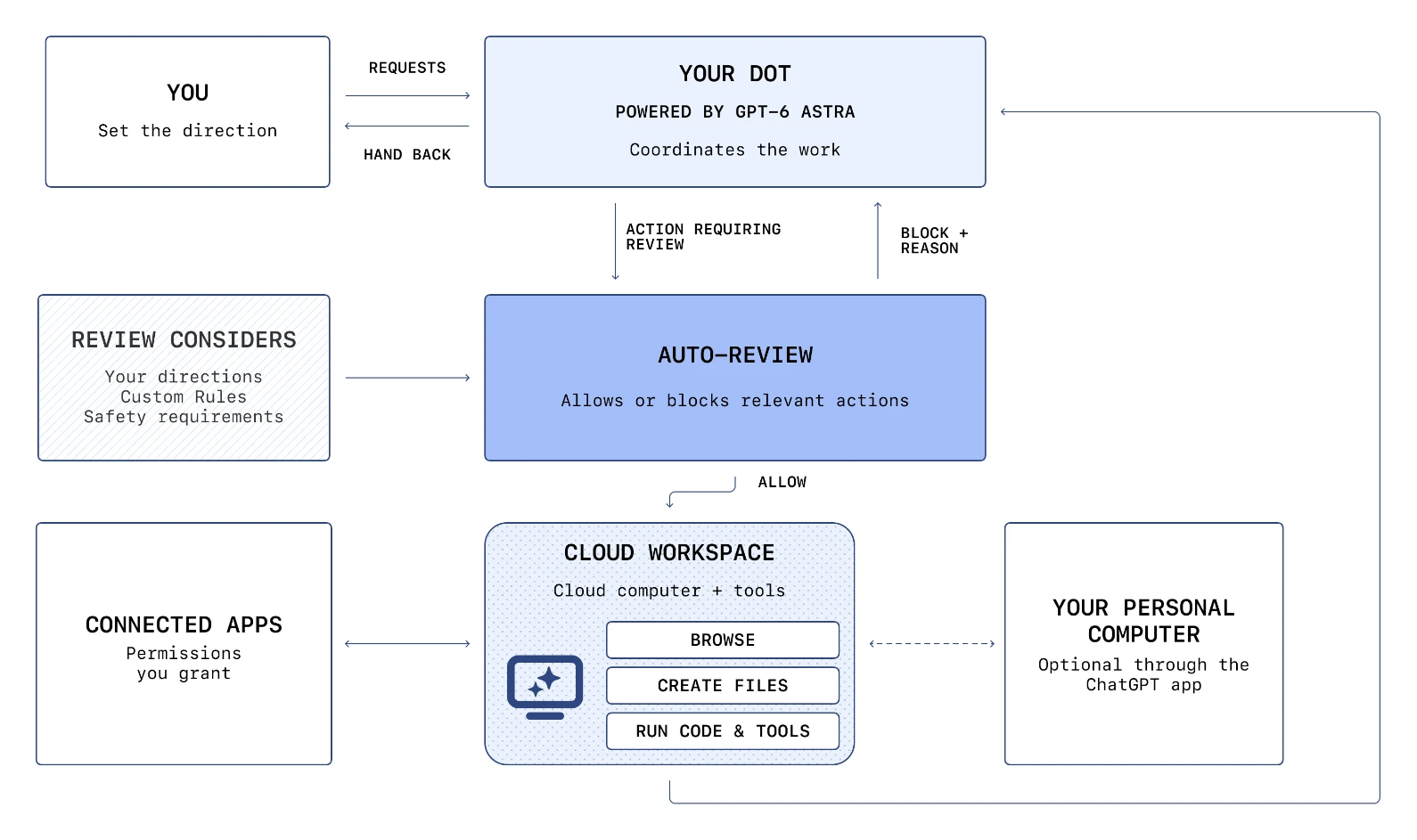
Each dot works inside its own cloud computer, and OpenAI describes the containment measures in detail.
You choose which accounts a dot can use, either by connecting apps within permissions already granted to ChatGPT or by signing into a website inside the dot's browser using secure sign-in where supported. Sandboxing inside the workspace restricts what code and tools that dot can reach, which contains the impact of harmful code or a mistaken command. OpenAI also states that users' cloud environments are isolated from one another, and that the underlying Linux operating system and Chrome browser are maintained by OpenAI.
The separation claim is the important one: dots run code in environments separate from the systems that coordinate their work and enforce key safeguards. They can create files and run tools there, but cannot use that access to change the safety systems or turn off required checks. The practical consequence is that a compromised or simply confused dot has a blast radius bounded by its own workspace plus whatever app permissions you granted.
Secure sign-in addresses the credential problem directly. For supported sign-ins, the model is paused while you complete a secure login form, which sends credentials straight to the browser environment and submits them without exposing them to the model's context. Supported saved-password flows keep that separation through a dedicated encrypted credential service that supplies the password without passing it to the model. OpenAI is also explicit about the limit: these protections apply to secure sign-in and saved-password flows specifically, and a secret placed separately in a readable message or document may still be visible to the model.
Proactive Research Is Read-Only by Construction
When you are not actively working with a dot, it looks for ways to help. OpenAI calls this proactive research, and the restrictions on it are enforced in code rather than described as intent.
These background tasks run inside the dot's cloud environment, use read-only tools to gather information from permitted connected sources, and save private notes for that dot. OpenAI states plainly that research tasks cannot directly send messages to other people, cannot change content in connected apps, and cannot control a browser or a desktop. A dot can use the findings to decide how to help, but any follow-up action follows the usual rules and checks.
The data-training boundary on this material is worth understanding precisely, because it is more nuanced than a simple opt-out. OpenAI states it does not train models directly on background research threads or the notes they produce. However, a dot may read a note from its background research, and information brought into an eligible conversation or task this way may then be used for training depending on your settings. OpenAI's own example: a background task gathering options for a European trip is not used directly, but if you later ask the dot to help plan a trip to Lisbon and it reads the Lisbon note, that note becomes context for an eligible conversation and may then be used for training. The rest of the background research is not used unless it is also brought into an eligible task.
For workspace accounts the default is different: OpenAI states that content from ChatGPT Business, Enterprise, and Edu workspaces is not used to improve models by default. On personal plans, the "Improve the model for everyone" setting is the control, and when model training is enabled it can include actions dots take and automations you set up, after identifiers are removed.
Where You Stay in the Loop
Two surfaces exist for watching and steering work, and both are on the human side of the loop by design.
Activity View in the desktop app shows ongoing and delegated tasks and their status. From it you can add context, correct a misunderstanding, change direction, or ask a dot to stop. OpenAI's safety monitoring adds a second signal: if monitoring flags a concern in a dot's active work, it can pause that work and show you a warning to review.
Context handling is stated explicitly. Dots build context over time, and when they delegate work the other agents are instructed to keep what the task needs and avoid retaining unnecessary sensitive details. Each dot has its own context, and you can reset it at any time.
One caveat is that dots can still make mistakes. OpenAI says so directly, in both the launch page and the safety write-up, and recommends reviewing consequential work. That is not boilerplate: it is a statement that the permission model reduces the chance of an unwanted action, not that it eliminates one.
What a Developer Can Hand Off
OpenAI Developers published a developer-specific list of what to give a dot, and the shape of that list is instructive because none of the items is a one-shot question.
The suggested handoffs are: triage recurring bug reports and feature requests across connected apps; scope failing builds and feature improvements against your priorities; build and test changes with Codex; and give the dot an ongoing development goal after teaching it your codebase, priorities, and what needs approval. The common thread is recurrence. A dot is suited to work that keeps arriving, where the context it accumulates is worth more than the per-task setup cost.
A second common thread is that every one of those handoffs ends in a review rather than in a merge. The dot prepares, tests, and proposes; you approve. That is consistent with the permission model, where sending and changing are gated and irreversible steps are confirmed.
Copying the Model into an Agent Skill
The reason this release is interesting beyond ChatGPT is that the permission architecture is portable. If you maintain an agent skill that takes actions in someone else's account, four of OpenAI's design decisions are worth copying directly.
Split read from write at the tool level, not the prompt level. OpenAI enforces the background read-only boundary in code, so a research task cannot send a message even if a model would otherwise try. If your skill relies on a system prompt saying "do not send emails", that is a request, not a boundary.
Put the reviewer outside the agent's reach. Auto-review's controls live where the dot cannot modify them. A skill that lets the agent edit its own approval rules has no approval rules.
Make blocks informative. When Auto-review blocks a step it returns the reason, which lets the dot ask for the information that would resolve the block. A silent block produces retry loops; a reasoned block produces a resolution.
Confirm the irreversible and hand back the sensitive. Deleting data, installing from unknown sources, and granting access get confirmations; password changes and money movement get handed back entirely. The category boundary is "Happens to be hard to undo" plus "Is inherently someone else's decision".
For the context side of the same problem, memory-management covers what an agent should persist and what it should reset, which matters because a dot's accumulated context is also its accumulated risk. autonomous-agent-patterns is the registry entry closest to the always-on execution model, and computer-use-agents covers the browser and desktop control layer that a dot's cloud workspace implements. For the code-level rules a write-capable agent should respect, security-best-practices is the relevant page, and code-review is where the propose-then-approve loop lands when the artefact is a patch.
Plans, Specialist Dots, and Enterprise Pilots
Availability has three tiers. Dots are rolling out to Pro and Business Premium users in eligible markets, with Enterprise, Edu, and Healthcare able to try the beta when a workspace admin enables it, off by default. Your first dot is included at no additional cost on those plans, available continuously, and the plan includes an allowance for deeper work with extended limits in the first month after launch. OpenAI states that it plans to let you add more dots later and scale a dot's output by increasing its speed or the amount of work it can take on per month. Conversations with a dot do not count toward ChatGPT usage limits, but when you ask a dot to start or manage tasks in Codex or ChatGPT Work, those tasks count as usual.
Onboarding requires the desktop app or a desktop browser: you create the first dot there, connect apps, and let it introduce itself, after which it is reachable from the ChatGPT mobile app.
Specialist dots are a separate, earlier-stage product. Where your dot works on your behalf, a specialist dot takes a dedicated responsibility inside an organisation, with its own identity, credentials, and access to the systems it needs. OpenAI says it is building on early internal testing across procurement, invoice processing, email marketing, customer support, and commercial contracting, and that it is starting with focused enterprise pilots where OpenAI's engineering teams work directly with the organisation to define responsibilities, tools, and the review and approval flow. Specialist dots are also being integrated with Microsoft Agent 365, with the stated goal of letting businesses manage dots through Microsoft's governance and security controls. No date, price, or eligibility criteria for specialist dots is published.
How These Claims Grade
Every statement in this guide comes from OpenAI, so the useful distinction is not first-party versus third-party but verifiable versus design-level. The table separates the two.
| Claim | Grade | Evidence and the fine print |
|---|---|---|
| dots are powered by GPT-6 Astra, with their own cloud computer and access to 4,000+ apps | Vendor-stated | "4,000+" is OpenAI's plugin-ecosystem count, not 4,000 audited integrations |
| Proactive research uses read-only tools and cannot send messages, change app content, or control a browser or desktop | Vendor-stated, design-level | OpenAI states the limits are enforced in code; no external audit is published |
| Auto-review controls sit outside the environments dots can change | Vendor-stated, design-level | An architecture claim that cannot be checked from outside |
| Secure sign-in and saved-password flows keep credentials out of the model's context | Vendor-stated | Applies to supported sign-in flows specifically; secrets written into readable content are not covered |
| Some actions are confirmed per use; password changes and money transfers are handed back | Vendor-stated | Categories are enumerated by OpenAI, not exhaustive by construction |
| First dot included at no extra cost on Pro and Business Premium | Vendor-stated | Absolute allowance is not published; "extended limits for the first month" is qualitative |
| Business, Enterprise, and Edu workspace content is not used for training by default | Vendor-stated | Personal plans are governed by the "Improve the model for everyone" setting instead |
| No capability benchmark for dots exists | Verified absence | Checked the launch page, the safety post, the product docs, and both official accounts |
| Dots can still make mistakes | Vendor-stated | Stated by OpenAI in both the launch page and the safety write-up, with a recommendation to review consequential work |
The pattern here is that dots make almost no measurable claims, so this article does not invent a performance comparison. The verifiable items are the ones about published availability and about the absence of published numbers.
What Is Not Published
Four gaps are worth naming, because each one changes what you can plan.
No capability benchmark of any kind. There is no task-completion rate, no latency measurement, no reliability figure, and no independent evaluation of a dot's output quality in the launch material or in the source set. If you see a performance number for dots, it is not from these sources.
No market list. Eligibility is defined by reference to a separate help article for eligible markets, which this article does not enumerate.
No dollar figures for Business Premium, Enterprise, or Edu. The framing is that the first dot is included at no extra cost. Deeper-work allowance and per-dot scaling are described qualitatively, with extended limits for the first month.
No specialist dot terms. No date, price, or eligibility criteria are published for specialist dots or the Agent 365 integration.
There is also a design question the material leaves open: how a dot's accumulated context behaves in a workspace where multiple people connect their own accounts. OpenAI states that permissions are shared across ChatGPT, ChatGPT Work, and Codex, and that each dot has its own context that can be reset, but it does not describe what happens to a dot's learned preferences when the human who provided them leaves a workspace.
Verdict
Worth adopting now if you already pay for Pro or Business Premium and you have recurring work with a clear review step: triage, scoping, drafting, and preparing changes for approval. The zero marginal cost of the first dot and the read-only boundary on background work make the risk profile reasonable for a supervised pilot.
Be cautious if you need unattended action on irreversible steps, or if your compliance position requires documented and independently verified safety controls. The controls are described rather than audited, and there is no third-party evaluation of dots in the public record.
Watch for the specialist dot terms, a published capability benchmark, and the Agent 365 integration. Any of those arriving would move dots from "reasonable personal delegation" to "something you can standardise an organisation around".
Two sibling articles extend this one. The DevDay 2026 roundup for agent builders places dots alongside the other 24 announcements and the same-day safety publication, and Codex Security Cloud workflows covers the other agent in this release that acts on connected repositories. For the vocabulary around packaging these workflows, see What Are Agent Skills?.
FAQ
What is a dot? An always-on agent in ChatGPT, powered by GPT-6 Astra, that runs on its own cloud computer, connects to apps you authorise, and keeps working between conversations. It can be reached in ChatGPT on desktop, web, and mobile, plus Slack and Teams.
Can a dot act without asking me first? Some actions, yes. Dots run on built-in rules with a separate Auto-review gate for actions that could affect your accounts or share information. Read-only steps proceed under app permissions; send, share, purchase, permanently delete, install from unrecognised sources, and grant new access are gated or confirmed; password changes and money transfers are handed back to you.
What is Auto-review? A separate safety system that checks a planned action against your directions, your Custom Rules, and safety requirements before it runs. It either allows the step or blocks it and returns the reason to the dot. OpenAI states its controls are kept outside the environments dots can modify.
Is proactive research safe? It is read-only by construction. Background research runs in the dot's cloud environment, uses read-only tools on permitted connected sources, and cannot send messages, change connected-app content, or control a browser or desktop. OpenAI states these limits are enforced in code.
Do dot conversations count against my ChatGPT limits? Conversations with a dot do not count toward your ChatGPT usage limits. Tasks you ask a dot to start or manage in Codex or ChatGPT Work do count as usual.
How much does a dot cost? Your first dot is included at no extra cost on Pro and Business Premium. Deeper-work allowance is included, with extended limits for the first month after launch. No separate price is published for Business Premium, Enterprise, or Edu, and per-dot scaling is described but not priced.
Can my dot use my passwords? For supported sites, secure sign-in pauses the model while you complete a login form so credentials go to the browser environment rather than into the model's context. Saved-password flows use a dedicated encrypted credential service that supplies the password without exposing it to the model. OpenAI notes that a secret written into a readable message or document may still be visible to the model.
Sources
Checked September 29, 2026.
OpenAI — primary
- Introducing dots — capability, availability, permissions, Custom Rules, pricing framing
- How we build safety, security, and privacy into dots — Auto-review, sandboxing, secure sign-in, proactive research limits, data controls, and the two architecture diagrams
- DevDay 2026 Recap — official availability line and launch framing
- dots product docs — setup path
- Auto-review sandboxing docs — the action-review mechanism
- dots help article
- Eligible markets help article
- Data controls in ChatGPT
- GPT-6 Astra system card change log — referenced by the dots safety page
- @OpenAI on X — dots launch thread, including the availability post embedded above
- @OpenAIDevs on X — the developer-facing handoff list
Next step
Ready to upgrade your agent?
Browse the open registry of agent skills for Claude Code, Codex, GitHub Copilot, and Antigravity. Every skill installs with one command.
