Copilot AI Credits for agent skills: budgeting skills, subagents and custom agents
Price SKILL.md runs, subagent fan-out and custom agents under GitHub Copilot AI Credits: worked costs, the 30-credit CLI floor, budgets and Fusion.
Agent Skills

Since June 1, 2026, every GitHub Copilot interaction that calls a model is metered in GitHub AI Credits, and one credit is $0.01. For someone who writes skills, that sentence changes the job. A SKILL.md is no longer only a quality question ("does the agent do the right thing"). It is also a cost question ("how many tokens does the right thing take, and who pays for them"). This guide is for people who build and run skills, custom agents and subagent workflows on Copilot, and it works through what the billing docs say, where they stay silent, and how to set budgets so a loop cannot quietly burn a month of allowance.
Everything below comes from GitHub's own documentation, its changelog and two first-party posts on X. Dollar and credit figures for skill runs are arithmetic on GitHub's published per-token prices, using token counts we invented and labeled. We did not run these workloads, so there are no measured bills, latencies or success rates here. Where the docs disagree with each other or say nothing, we say so.
The billing facts a skill author needs
Copilot converts the token cost of each interaction into credits at the model's listed rate. The cost depends on two things only: which model ran and how many tokens it consumed (fresh input, cached input, cache writes and output). Plan prices did not change. Copilot Pro is $10 a month with 1,500 credits, Pro+ is $39 with 7,000, and Max is $100 with 20,000. Business and Enterprise seats include 1,900 and 3,900 credits per user, pooled across the organization. Included credits reset at 00:00:00 UTC on the first of each month and do not roll over.
Code completions and next edit suggestions use no credits. Chat, the CLI, the cloud agent, Spaces, Spark, code review and third-party coding agents do. A skill is not a separate product with its own meter in anything we read. A skill is a folder of instructions that Copilot loads when relevant, so its cost shows up inside whichever surface is running it: agent mode in an editor, Copilot CLI, the Copilot app, the cloud agent or code review. The docs say agent skills work with all of those.
That working model has one practical consequence. The tokens a skill causes come from three places: the instructions Copilot loads from the skill folder, the files and tool output the agent reads while following them, and the output it writes back. Loading instructions into context is an inference from how token billing works, because the docs describe loading but do not itemize it. Treat it as a cost you can test rather than a number you can look up.
Which surfaces run skills, and what each lets you control
The table below combines the billing docs, the skills docs and the CLI docs. "Skills supported" comes from the agent skills overview. The control column lists only controls the docs describe for that surface.
| Surface | Billed in credits | Skills supported | Spend controls documented |
|---|---|---|---|
| Agent mode in VS Code and JetBrains | Yes | Yes | Model choice, budgets in billing settings |
| Copilot CLI | Yes | Yes | Session limit (public preview), model choice, budgets |
| Copilot app | Yes | Yes | Model choice, Fusion effort, budgets |
| Copilot cloud agent | Yes, per the billing pages | Yes | Budgets, model choice; no per-session cap documented |
| Copilot code review | Yes, plus Actions minutes | Yes | Review effort level, budgets |
Two rows deserve a second look. The cloud agent's own about page still says it uses GitHub Actions minutes and Copilot premium requests, while the individuals billing page lists it among the AI credit features. Those could be two meters running at once or one page lagging the other. We could not resolve it from the pages, so we give no per-session price for the cloud agent and suggest you read your first few runs off the usage page before you schedule anything unattended.
The other row is code review. Each review is billed twice: tokens in AI credits and the agentic infrastructure in GitHub Actions minutes at normal per-minute rates. GitHub publishes estimated credit costs per review by effort level, because the model is chosen automatically and not disclosed.
| Review effort level | Typical range per review | Approximate average |
|---|---|---|
| Lite | $0.05 to $1 | $0.25 (25 credits) |
| Balanced | $0.25 to $5 | $1.50 (150 credits) |
| Max | $1.50 to $25 | $10 (1,000 credits) |
GitHub labels these as estimates that exclude Actions minutes and that rise with pull request size and repository custom instructions. The credit column is our conversion at $0.01. If you add a review skill or a long repository instruction file, expect the estimate to move up, not down.
Price a skill run before you ship it
The per-model prices come from GitHub's models and pricing page, quoted per million tokens. Multiply by 100 to get credits. These are the default-tier prices for four models that span the range.
| Model | Input | Cached input | Cache write | Output |
|---|---|---|---|---|
| Claude Haiku 5.5 (up to 100K context) | $0.10 | $0.01 | $0.125 | $0.50 |
| GPT-6.1 Terra (up to 272K context) | $1.00 | $0.05 | $1.25 | $5.00 |
| Claude Sonnet 5.5 | $2.00 | $0.10 | $2.50 | $10.00 |
| Claude Opus 5.5 | $4.00 | $0.20 | $5.00 | $20.00 |
Several models switch to a higher price above a context threshold, 272K input tokens for the GPT-6 and GPT-6.1 families and 100K for Claude Haiku 5.5. A skill that pulls a big file tree into one call can cross that line, so the Haiku numbers below assume every call stays under 100K.
We priced three skill shapes. The token counts are assumptions chosen to look plausible, in millions of tokens, and they are not measurements.
| Shape | Fresh input | Cached input read | Cache write | Output |
|---|---|---|---|---|
| A. One skill, one agent (a focused review or a doc update) | 0.06 | 0.20 | 0.02 | 0.008 |
| B. The same skill plus three subagents, each with its own context | 0.36 | 1.10 | 0.11 | 0.038 |
| C. A long skill chain run in one session (plan, edit, test, fix) | 0.40 | 2.00 | 0.20 | 0.05 |
Shape B is shape A for the main agent plus three subagents that each use 0.10 fresh input, 0.30 cached read, 0.03 cache write and 0.01 output. The totals add up to the B row.
| Shape | Haiku 5.5 | GPT-6.1 Terra | Sonnet 5.5 | Opus 5.5 |
|---|---|---|---|---|
| A. One skill, one agent | 1.45 credits | 13.5 credits | 27 credits | 54 credits |
| B. Skill plus three subagents | 7.98 credits | 74.25 credits | 148.5 credits | 297 credits |
| C. Long skill chain | 11 credits | 100 credits | 200 credits | 400 credits |
The Sonnet 5.5 line for shape A shows the method. 0.06 million fresh input at $2.00 is $0.12. 0.20 million cached input at $0.10 is $0.02. 0.02 million cache write at $2.50 is $0.05. 0.008 million output at $10.00 is $0.08. The total is $0.27, or 27 credits.
Three things stand out. Model choice dominates: the same run costs 54 credits on Opus 5.5 and 13.5 on GPT-6.1 Terra, a factor of four. Fan-out is not free: giving the main agent three subagents turned 27 credits into 148.5 on Sonnet 5.5, about 5.5 times as much, and the isolated context windows are the reason, because each subagent re-reads what it needs instead of sharing the parent's cache. And cache terms matter: in shape C on Sonnet 5.5, the 2.0 million cached tokens cost $0.20, while the same tokens billed as fresh input would cost $4.00.
How many runs fit in an allowance
Dividing a plan's credits by the per-run credits gives a scale marker. It ignores everything else you do in Copilot that month, including chat, so treat it as an upper bound on what the allowance can fund.
| Shape on Sonnet 5.5 | Credits per run | Runs in Pro (1,500) | Runs in Pro+ (7,000) | Runs in Max (20,000) |
|---|---|---|---|---|
| A. One skill, one agent | 27 | 55.6 | 259.3 | 740.7 |
| B. Skill plus three subagents | 148.5 | 10.1 | 47.1 | 134.7 |
| C. Long skill chain | 200 | 7.5 | 35 | 100 |
A team that runs a review skill 20 times a day over 22 working days is doing 440 runs a month. At shape A on Sonnet 5.5 that is 11,880 credits. That is more than Pro+ includes and about 59% of Max, before anyone has opened chat. On GPT-6.1 Terra the same 440 runs cost 5,940 credits. Those are arithmetic results on our assumed profile, and the point is to show which lever moves the number. Switching the model halves it. Cutting tokens per run changes it in proportion. Changing plan only changes how much is pre-paid.
If your skills run in a repository owned by an organization, the included credits are pooled. One hundred Copilot Business seats make a shared pool of 190,000 credits, and a heavy skill user draws on the same pool as everyone else. User-level budgets exist to stop one person from consuming it. More on that below.
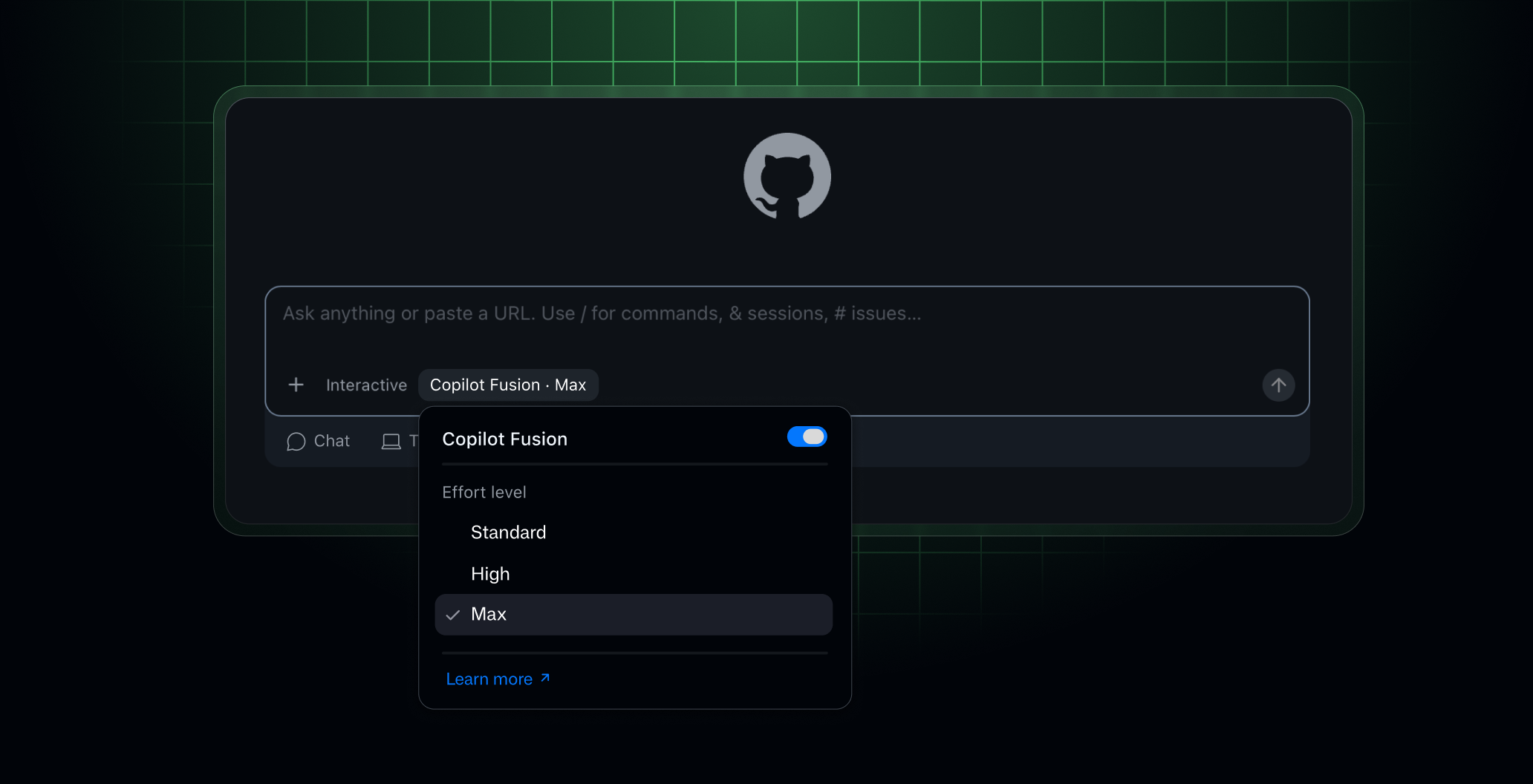
Fusion and Auto when a skill is running
Copilot Fusion became generally available on October 28, 2026. It is a router and orchestrator, not a model. You pay each model it uses at that model's standard rate, with no separate Fusion fee, and paid plans get 30% off model costs through November 30, 2026. Fusion chooses among three execution patterns per prompt: single, cascade (an efficient model drafts and a judge accepts or escalates) and critique (one model drafts while several critique in parallel). Fusion High and Max can use more than one model per task, so a task can use more credits than at Standard.
For skill authors, the interaction details matter more than the headline.
- The docs list Fusion for VS Code, the Copilot app, Copilot CLI and JetBrains IDEs. The cloud agent on GitHub.com is not in that list. If you plan to run Fusion on cloud agent jobs, check the live docs first.
- Fusion works separately from subagents and does not start them. A skill that fans out to subagents still pays for the subagents, and Fusion's internal routing is a second layer on top of whatever the main session does.
- Fusion has no context window of its own and shows a conservative value based on the smallest limit among the models it uses.
- If Fusion discards a draft, file edits that draft already made are not undone automatically. A skill that writes files should be followed by a review step before commit.
- Fusion tries to keep the main conversation on the same model so cached tokens keep helping. Anything that switches models mid-session can turn cheap cached reads into fresh input.
Auto model selection is the other router. It has Efficiency, Balance and Intelligence tiers, charges by the model it picks, and gives paid plans a 10% discount on model costs in Copilot Chat and the cloud agent. Our two saved versions of the docs disagree on whether the 10% also covers the CLI and the Copilot app. The docs do not say whether the 10% and the Fusion 30% can combine, so budget as if they cannot.
Artificial Analysis benchmarked Fusion at max effort in Copilot CLI on its Coding Agent Index and reported $5.59 per task against $11.42 for Claude Code with Opus 5.5 at max, with Fusion scoring 60 against 62. GitHub's changelog adds roughly 40% less time per task, a number that appears only in GitHub's own text. At $0.01 a credit, $5.59 is 559 credits, about 391 with the 30% discount. That is one benchmark's API cost for coding tasks, run by a third party, and it says nothing certain about your skill, which is why we show it as scale only.
Skills, custom agents and where they live
The skills docs say Copilot supports project skills in .github/skills, .claude/skills or .agents/skills, and personal skills in ~/.copilot/skills or ~/.agents/skills. Each skill sits in its own lowercase, hyphenated directory with a file named SKILL.md. The frontmatter needs name and description, and license is optional. The description tells Copilot when to use the skill, so it also decides when the skill is loaded, which is a cost decision as well as a routing decision. A description that matches too many prompts loads the skill into sessions that did not need it.
Custom agents are Markdown agent profiles with YAML frontmatter. They can live at user level ($HOME/.copilot/agents), repository level (.github/agents), organization level and enterprise level. By default an agent can use all available tools, including MCP server tools, unless you restrict the tools list. The profile is available to the cloud agent, the cloud agent in IDEs, the Copilot app and Copilot CLI.
The tools list is the cheapest control you own. An agent that cannot call a large search tool cannot fill its context with search results. A profile that names three tools keeps tool output small by construction. The docs describe the tools property as optional and defaulting to everything, which means a profile without it carries the maximum surface area.
The skills docs also describe allowed-tools in a skill's frontmatter. It lists tools Copilot may use without asking each time. That is a permissions feature, not a cost feature, and the docs carry a warning against pre-approving shell or bash for skills you have not reviewed. We repeat it because an unattended skill with shell pre-approved is also an unattended skill that can loop.
If you are writing skills that other people will install, the registry pages are a useful starting reference. agent-skill-creator covers authoring a skill from a repeated workflow, agents-md-generator produces the AGENTS.md instruction files that become part of every session's context, and context-optimization is about keeping context targeted, which is the same lever your credit balance cares about. The GitHub docs' own example skill is github-actions-failure-debugging, and it makes a good cost lesson: its instructions tell the agent to call a tool that returns an AI summary of failed job logs instead of pulling thousands of lines of raw logs into context, and only fetch full logs if the summary is not enough.
Subagents in Copilot CLI: isolation costs tokens
Copilot CLI includes built-in agents the main agent can run as subagents: explore, task, general-purpose, code-review, research, rubber-duck and security-review. Subagents get a separate context window, so they can handle a subtask without cluttering the main agent's context, and some can run in parallel. The docs describe /fleet as a way to speed up large tasks by breaking them into parallel subtasks run by subagents.
Speed and cost pull in different directions here. Parallel subagents finish sooner, and our shape B shows what they can cost: 5.5 times shape A on the same model. Isolation is the benefit, because the main context stays small, but each subagent pays to rebuild the context it needs. The right question for a skill is not "should this use subagents" but "does each subagent read less than the parent would have read to do the same work".
Some built-in agents are cheap by design. The explore agent is described as fast and lightweight, read-only, and safe to run in parallel with others. The task agent returns a brief summary on success and full output on failure, which keeps test and build noise out of the parent's context. The rubber-duck agent runs on a different model from the one driving your session, which means a second opinion also means a second model's rates on top of your main one. The docs do not give credit prices for any of these agents, so measure them.
For building skills that orchestrate subagents, subagent-driven-development describes executing implementation plans through independent tasks, and agent-context-isolation is the registry page closest to the context-isolation trade-off above. Neither is a Copilot-specific skill, and they are links to the registry rather than a claim that they behave the same under Copilot's billing.
Two more CLI behaviors affect cost. Copilot CLI has infinite sessions, with automatic compaction that summarizes conversation history, and a manual /compact command that is rarely needed. The best-practices page also advises using /clear or /new between unrelated tasks. Both are budget advice as well as hygiene: every turn re-sends context, so a session that carries yesterday's unrelated work pays to carry it.
Session limits: the one per-run cap, and its floor
Copilot CLI has an AI credit session limit, currently in public preview. In an interactive session, /limits set max-ai-credits NUMBER caps the session and /limits unset removes the cap. In a non-interactive run, pass --max-ai-credits NUMBER. The minimum is 30 credits. When the limit is reached the agent stops cleanly, and in interactive mode you are prompted to reset the limit and continue. It is a soft limit: a response already in progress finishes first, so actual use can slightly exceed the number you set. It is also not a monthly cap.
The 30-credit floor is worth reading against our worked table. On Sonnet 5.5, 30 credits is $0.30, which buys 150,000 fresh input tokens or 30,000 output tokens at list rates. Our shape A run costs 27 credits on Sonnet 5.5, so a single focused skill run nearly fills the smallest limit you are allowed to set. On Opus 5.5 the same $0.30 buys 75,000 fresh input tokens or 15,000 output tokens, and shape A (54 credits) does not fit under the minimum limit at all. On Haiku 5.5 the floor is $0.30 for 3 million fresh input tokens or 600,000 output tokens, which is generous.
| Model | What 30 credits ($0.30) buys: fresh input | What 30 credits buys: output |
|---|---|---|
| Claude Haiku 5.5 | 3,000,000 tokens | 600,000 tokens |
| GPT-6.1 Terra | 300,000 tokens | 60,000 tokens |
| Claude Sonnet 5.5 | 150,000 tokens | 30,000 tokens |
| Claude Opus 5.5 | 75,000 tokens | 15,000 tokens |
Those are list-rate conversions, not what a mixed session with cache reads would consume. They do show why a cap that works for a short Haiku job is nearly meaningless as protection on an Opus job, and why a cap tuned for exploratory sessions should be set per task type. For scheduled or scripted runs, set --max-ai-credits explicitly and sized to a multiple of your measured per-run cost rather than to a round number.
Budgets for people who publish skills to a team
Individuals have a dollar budget for additional usage in billing settings, with optional alerts at 75%, 90% and 100%, and an option to stop usage when the budget is reached. The Bundled AI credits budget type sets one limit across every feature that uses credits. Because 1 credit is $0.01, a $10 budget is 1,000 credits.
Organizations have more layers. User-level budgets cap what one person can consume from the pool and from paid usage together, and they always enforce a hard stop. Cost center, organization and enterprise budgets cap only the metered charges that start after the pool is exhausted, and they stop usage only if you enable Stop usage when budget limit is reached, which is off by default. Requests are checked in order: user-level budget first, shared pool second, then the metered budgets. The metered phase also requires the AI credit paid-usage policy to be enabled, and it is enabled by default for organizations.
If you publish a skill to a team, three team-level decisions follow.
- Put a universal user-level budget in place before the skill becomes popular. One enthusiastic user running shape B all day can drain a pool built for many.
- Use an individual user-level override with an expiry date for a sprint or an incident, rather than raising the universal number.
- Decide whether Fusion is allowed, and which models it may use. Enterprise administrators can disable specific models for Fusion without disabling them for everyone.
On monitoring, the usage page breaks credits down by model, and the docs say you generally cannot trace credits to specific prompts, sessions or exact features. For a skill author that means you cannot read a skill's cost off a dashboard row. You can bracket it. Run the skill alone on a quiet account, note the by-model change, and repeat on a second model. Minimum client versions also matter for accurate pricing and alerts, for example VS Code 1.120 and Copilot CLI 1.0.48.
Writing skills that cost less
Everything above reduces to design rules for the skill itself. These follow from how token billing works, and none comes from a GitHub benchmark.
- Keep the description narrow. It decides when the skill loads, so a vague description loads the skill into sessions that never needed it.
- Put long reference material in separate files in the skill folder and tell the agent when to read each. The docs say Copilot discovers all files in the skill directory and makes them available alongside the instructions, which makes it practical to keep
SKILL.mdshort. - Return summaries, not raw output. The GitHub example skill does this with its job-log summary tool. A tool that returns 40 lines instead of 4,000 saves input tokens on every later turn, because the output stays in context.
- Restrict the
toolslist in custom agent profiles to what the job needs. - Do not make the skill switch models in the middle of a session unless the saving is clear, since switching can break caching.
- For fan-out, count what each subagent has to read. If the answer is "most of what the parent read", fan-out is a speed purchase and not a saving.
- End unattended skills with a stop condition and a session limit sized to a multiple of the measured run cost.
- Add a review step after any draft-writing flow, since discarded Fusion drafts can leave edits behind.
Choosing between routes for a given job is a model-and-surface decision. The decision table below sums up what the docs support, with the arithmetic caveats above.
| If your skill is... | Prefer | Why, from the docs and our arithmetic | Watch for |
|---|---|---|---|
| A short, focused task run many times a day | A lightweight or mid-tier model, or Fusion Standard | Per-run credits scale with model price, 13.5 on Terra against 54 on Opus in shape A | Haiku's 100K context tier |
| A long plan, edit and test chain | A mid-tier model with a session limit set to a multiple of your measured cost | Shape C reaches 200 credits on Sonnet 5.5 | Cache loss from model switches |
| A fan-out across independent files | Subagents only if each reads far less than the parent | Shape B is about 5.5 times shape A | Per-subagent context rebuild |
| A scheduled unattended CLI job | --max-ai-credits plus a Bundled AI credits budget with Stop usage on | Session cap is soft, budget is the backstop | The 30-credit minimum |
| A pull request review skill | Lite as default, Balanced selectively | Averages of 25 and 150 credits per review before Actions minutes | PR size and custom instructions raise cost |
| A cloud agent job on GitHub.com | Read the first runs off the usage page before scheduling | Billing is listed as credits, the about page still mentions premium requests | No per-session figure documented |
Other agent-skills guides on this site cover the same budgeting problem from the model side. See model routing for agent skills on GPT-6, Opus 5.5 versus Sonnet 5.5 for agent skills, cost planning across ultrafast and pro tiers and cloud agent workflows with Codex Security. For counting tokens and routing between models independent of Copilot, ai-cost-optimizer is a registry skill aimed at multi-model routing.
What we could not confirm
- The size of the Copilot Free and Student credit allowance. The docs we read say they have one and give no number.
- Any fixed credit price for a cloud agent session, and whether the Actions minutes and premium requests mentioned on its about page apply alongside credits.
- Any per-skill or per-custom-agent charge. We found none, and cannot prove none exists.
- Credit prices for built-in subagents, and for Fusion's internal steps. The docs say you can hover over the effort level below a response to see which models were used. They do not list credits per step.
- Whether the Fusion 30% and the auto 10% discounts combine, and whether the 10% covers the CLI and the Copilot app. Two saved versions of the docs disagree.
- Whether the context a skill's instructions occupy is billed the way any other input is. We infer it from token billing, and the docs do not itemize it.
- Per-model prices change. Gemini 4 Argon's price is promotional until December 1, 2026, and the flex allotment on each plan is described as variable.
Verdict
Under credits, the cost of a skill is the cost of the tokens it makes the agent use, priced at the model it runs on. That makes three levers worth owning: the model, the context the skill adds or avoids, and the fan-out. A short skill on a mid-tier model is cheap enough that the plan allowance hardly matters. A fan-out skill on a frontier model is not, and under credits there is no silent fallback to a cheaper model when the balance runs out, so it ends in a stop or a bill.
The practical routine is short. Price one run with your own token counts, using the formula above. Put a user-level or Bundled AI credits budget with a hard stop in place before the skill spreads. Set a session limit in the CLI for unattended runs, sized above your measured cost and aware of the 30-credit floor. Try Fusion before November 30, 2026 while the 30% discount lasts, then price it again at list rates, because December will look like the undiscounted number.
Sources
- GitHub Docs, Usage-based billing for individuals: https://docs.github.com/en/copilot/concepts/billing/usage-based-billing-for-individuals
- GitHub Docs, Usage-based billing for organizations and enterprises: https://docs.github.com/en/copilot/concepts/billing/usage-based-billing-for-organizations-and-enterprises
- GitHub Docs, Models and pricing for GitHub Copilot: https://docs.github.com/en/copilot/reference/copilot-billing/models-and-pricing
- GitHub Docs, Budgets for usage-based billing: https://docs.github.com/en/copilot/concepts/billing/budgets-for-usage-based-billing
- GitHub Docs, Setting up budgets to control spending on metered products: https://docs.github.com/en/billing/how-tos/set-up-budgets
- GitHub Docs, Setting an AI credit session limit in GitHub Copilot CLI: https://docs.github.com/en/copilot/how-tos/copilot-cli/set-ai-credit-session-limit
- GitHub Docs, Monitoring your GitHub AI Credits usage: https://docs.github.com/en/copilot/how-tos/manage-and-track-spending/monitor-ai-credit-usage
- GitHub Docs, About GitHub Copilot Fusion: https://docs.github.com/en/copilot/concepts/models/copilot-fusion
- GitHub Docs, About GitHub Copilot auto model selection: https://docs.github.com/en/copilot/concepts/auto-model-selection
- GitHub Docs, About GitHub Copilot cloud agent: https://docs.github.com/en/copilot/concepts/agents/cloud-agent/about-cloud-agent
- GitHub Changelog, Route and orchestrate models with GitHub Copilot Fusion, October 28, 2026: https://github.blog/changelog/2026-10-28-route-and-orchestrate-models-with-github-copilot-fusion/
- GitHub Blog, GitHub Copilot is moving to usage-based billing, April 27, 2026: https://github.blog/news-insights/company-news/github-copilot-is-moving-to-usage-based-billing/
- @github on X, October 28, 2026: https://x.com/github/status/2115480207469560109
- @ArtificialAnlys on X, October 28, 2026: https://x.com/ArtificialAnlys/status/2115477376981508419
Next step
Ready to upgrade your agent?
Browse the open registry of agent skills for Claude Code, Codex, GitHub Copilot, and Antigravity. Every skill installs with one command.


