Kimi K3.1 Pro for agent skills: setup, cost per run, and rate limits
Run SKILL.md workflows and subagents on Kimi K3.1 Pro: harness setup, worked cost per skill run, cache effects, API tiers, and subscription quota.
Agent Skills

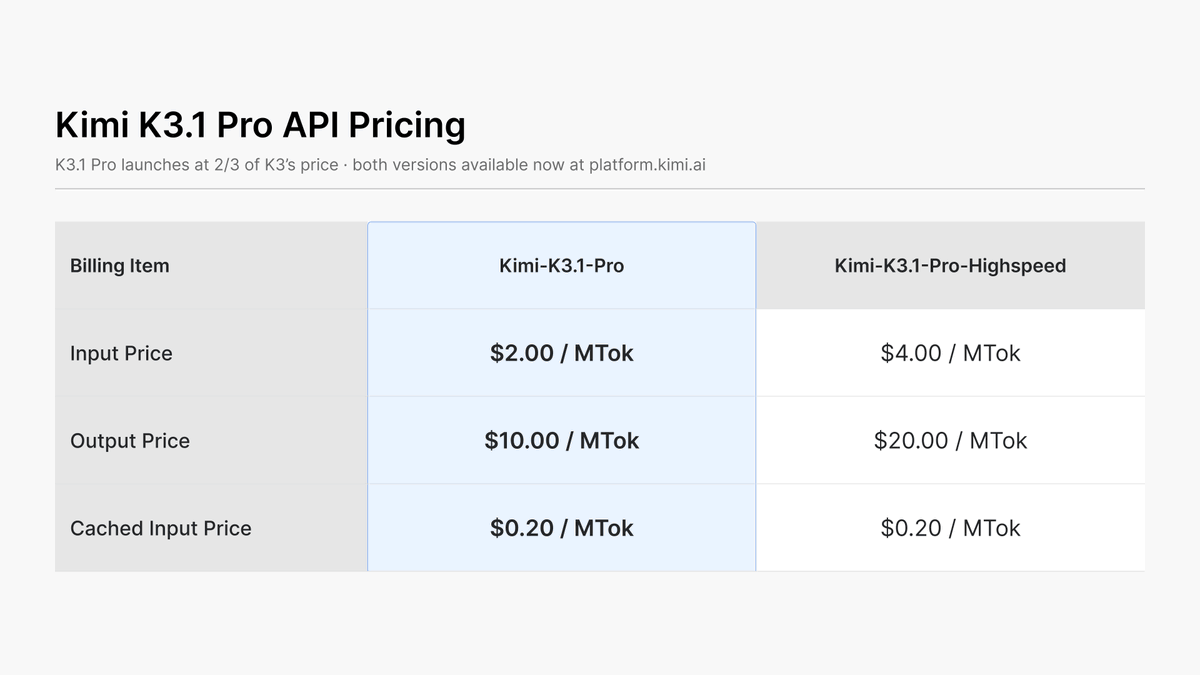
Moonshot AI released Kimi K3.1 Pro on October 23, 2026, and for people who run agent skills the interesting part is not the leaderboard position. It is what one skill invocation costs, how many subagents a plan can sustain, and which harness settings make a SKILL.md workflow behave the same on Kimi as it did on another model. The list price is $2.00 per million input tokens, $10.00 per million output tokens and $0.20 per million cached input tokens, with a Highspeed variant at $4.00 and $20.00. The context window is 1,048,576 tokens on both.
This guide treats the model as a runtime for skills. It covers three documented ways to point an existing harness at K3.1 Pro, how skills and subagents behave in Kimi's own CLI, a worked cost table for four skill shapes, the API rate-limit tiers that decide how many subagents can run at once, and the subscription quota rules, including the apology Moonshot posted two days after launch. Every price and limit comes from Moonshot's pages. Every dollar figure for a skill run is arithmetic on those prices using token counts we assumed, and it is labeled that way. Nothing here was run by us, so there are no measured latencies or success rates.
The short version for skill authors
Three facts decide most of the design.
First, cached input costs one tenth of regular input, and a skill that re-reads the same instructions, references and repository context on every step is mostly paying the cached rate. A skill that rewrites its own prompt prefix each turn pays the full rate.
Second, output is five times the price of regular input, and K3.1 Pro always has thinking switched on. The reasoning_effort parameter accepts low, high or max, with max as the default. A skill that classifies or formats does not need the default.
Third, each subagent is a separate context that consumes tokens on its own. Kimi's documentation says so directly, and Moonshot's October 25 post names unnecessary subagent calls as something it is reducing on the subscription plan. Fan-out is the cost multiplier to watch.
Where K3.1 Pro can run your skills
Moonshot documents several routes. The table lists them from the skill author's point of view: where the SKILL.md files are read from, what the model ID is, and what you pay.
| Route | Skill discovery | Model ID | Billing |
|---|---|---|---|
| Kimi Code CLI | Scans project, user, extra and built-in skill directories | Chosen with /model | Membership quota, Plus and above |
| Claude Code through Kimi Code | Claude Code's own skill and subagent loading | k3.1-pro or k3.1-pro[1m] | Membership quota |
| Claude Code through the platform endpoint | Claude Code's own loading | Guide example uses kimi-k3[1m] | Pay per token |
| Codex | Codex's own loading | kimi-k3.1-pro | Pay per token |
| Your own loop on the API | Whatever you write | kimi-k3.1-pro or kimi-k3.1-pro-highspeed | Pay per token |
The harness decides how skills are found and invoked. The model only sees the resulting prompt. That separation is useful: a skill written for one harness does not change because the model behind it changed, but the model's behavior on tool calls and long contexts can. Moonshot's launch material reports its coding results with the Claude Code harness, which makes Claude Code the best-documented pairing for a skill library that already exists.
Kimi Code CLI: skills as files
Kimi Code CLI treats a skill as a Markdown file with YAML frontmatter. The directory form is the recommended one: a folder named after the skill with a SKILL.md inside, plus any scripts or reference files next to it. A flat .md file dropped into a skills directory also registers, and takes its name from the filename, but it has no folder of its own, so it cannot carry supporting files.
Discovery follows scope. The CLI scans four tiers and the more specific one wins: project, then user, then extra directories declared in config.toml, then built-in skills. Project skills live in .kimi-code/skills/ or .agents/skills/ under the nearest directory that contains .git. User skills live in ~/.kimi-code/skills/ or ~/.agents/skills/. The ~/.agents/skills/ path is the same convention other agent tools use, so a library kept there is shared rather than copied.
The frontmatter has a small set of fields. name and description are both required in the directory form, and leaving either out makes parsing fail. description is the line the model reads to decide whether to invoke the skill, so it is effectively the trigger, and it is worth writing as a decision rule instead of a title. whenToUse adds a second hint. type is prompt by default, inline behaves the same, and flow means manual invocation only. Setting disableModelInvocation: true blocks automatic invocation. Named arguments become $name placeholders in the body, and ${KIMI_SKILL_DIR} resolves to the skill's folder so a body can point at its own reference files.
Invocation is either manual, with /skill:<name> and optional arguments, or automatic from the description. Skill invocations can nest up to three levels deep and are terminated beyond that. For cost purposes the nesting limit matters less than the fact that each nested skill adds its body to the context, and every added token is billed either as an input write, a cache hit or a fresh input depending on whether the prefix matches.
If you maintain skills for several harnesses, the registry already has pages that cover this ground: kimi-cli-help for the CLI itself, kimi-integration for wiring Kimi into other tools, and skill-creator for authoring a SKILL.md from scratch.
Claude Code on K3.1 Pro
Moonshot gives two separate Claude Code guides and they do not agree on the model name, so read the right one for your key.
The Kimi Code documentation is for membership keys. It points ANTHROPIC_BASE_URL at https://api.kimi.ai/coding/ and uses k3.1-pro or k3.1-pro[1m] as the model. Its settings.json block sets the main model, the default Fable, Opus, Sonnet and Haiku slots, the subagent model, the effort level, and two context variables:
{
  "env": {
    "ANTHROPIC_BASE_URL": "https://api.kimi.ai/coding/",
    "ANTHROPIC_API_KEY": "Your API Key",
    "ANTHROPIC_MODEL": "k3.1-pro[1m]",
    "ANTHROPIC_DEFAULT_FABLE_MODEL": "k3.1-pro[1m]",
    "ANTHROPIC_DEFAULT_OPUS_MODEL": "k3.1-pro[1m]",
    "ANTHROPIC_DEFAULT_SONNET_MODEL": "k3.1-pro[1m]",
    "ANTHROPIC_DEFAULT_HAIKU_MODEL": "k3.1-pro[1m]",
    "CLAUDE_CODE_SUBAGENT_MODEL": "k3.1-pro[1m]",
    "CLAUDE_CODE_EFFORT_LEVEL": "high",
    "CLAUDE_CODE_AUTO_COMPACT_WINDOW": "1048576",
    "CLAUDE_CODE_MAX_CONTEXT_TOKENS": "1048576"
  }
}
Two settings in that block matter for skill libraries. CLAUDE_CODE_SUBAGENT_MODEL decides which model every subagent uses. Pointing it at the same K3.1 Pro as the main loop is the simple choice, and it also means every delegated task is billed at K3.1 Pro rates. The block maps the Haiku slot to K3.1 Pro as well, so a harness that would normally send small tasks to a cheaper tier sends them to the same model here. If your skills rely on that routing for cost control, the routing is gone unless you change the mapping. The effort variable is set to high in Moonshot's example, not max, which is the lever discussed in the cost section.
The context numbers depend on the plan. The Kimi Code page ties k3.1-pro with a 262,144-token window to Plus, and the 1,048,576-token window plus k3.1-pro-highspeed to Pro and above. The auto-compact window should match the context you actually have, otherwise the harness either compacts too early or tries to hold more than the plan allows. Moonshot also says to pick a single configuration method: either the settings file or exported variables, not both.
The platform guide is for pay-as-you-go keys. It uses https://api.moonshot.ai/anthropic as the base URL and passes the key as ANTHROPIC_AUTH_TOKEN. Its example model is kimi-k3[1m], which is K3, not K3.1 Pro. We could not confirm from the page we read which model string selects K3.1 Pro on that endpoint, so the safe step is a single test call with the model string you intend to use before a skill library depends on it. For a broader view of running Claude Code against other models, the registry's claude-code page is the place to start.
Codex and the plain API
Moonshot's Codex guide uses a provider block that calls the OpenAI-compatible endpoint with the Responses wire format:
model = "kimi-k3.1-pro"
model_provider = "kimi"
model_context_window = 1048576

[model_providers.kimi]
name = "Kimi"
base_url = "https://api.moonshot.ai/v1"
env_key = "KIMI_API_KEY"
wire_api = "responses"
The guide explains that model_context_window has to match the 1M window, because without it Codex falls back to default metadata for an unknown model. For a custom loop, the quickstart uses the OpenAI Python SDK against https://api.moonshot.ai/v1 as the base URL. The one behavior that bites hand-written agent loops is multi-turn state: the tool-calling section of the quickstart says to return the complete assistant message to the next request and add one tool result per call with the matching tool_call_id. A runner that rebuilds the assistant turn from its text alone is departing from that instruction, and we have not tested what it costs in quality. The registry's codex-subagent page covers the delegation pattern on the Codex side.
Subagents: isolation is a cost feature and a cost
Kimi Code CLI ships three built-in subagents. coder is the default general-purpose one that can read and write files and run commands. explore is read-only and meant for searching and summarizing a repository. plan has no shell access and is for design work. None of the three can dispatch further subagents, and a custom agent inherits that allowlist unless it declares its own subagents list, so delegation chains end by default.
Each subagent runs in its own context window. It sees only the task description the main agent passes, and only its final result flows back. That is the benefit: a long session does not fill with exploratory logs, and several subagents can run in parallel. The price is stated in the same section of the documentation: each subagent independently consumes model tokens, and for simple tasks the main agent handles them more economically.
For skill design that translates into a rule. Delegate when the work is large, parallel or noisy, such as reading a hundred files to answer one question, and keep it inline when the work is a quick edit. A skill whose body says "always spawn an explorer first" pays a fresh context for every run, even when the answer is one file. The cost table below puts a number on that.
Custom agents are Markdown files with frontmatter: a description that guides delegation, an optional whenToUse, a tools allowlist, a disallowedTools denylist and an optional subagents allowlist. The documentation notes that unknown fields are ignored, that fields from other tools such as Claude Code's model are skipped, and that the comma-separated tools form keeps Claude Code style agent files loadable. A minimal file with a description and a body works across tools. In practice that means an agent library written for one harness can be tried on Kimi Code CLI without a rewrite, though anything that depended on a per-agent model override will not carry over.
The documentation also carries a security note that skill authors should read. Agent files are prompt configuration, and project-level files come from the repository itself. A project file named agent.md with override: true replaces the default main agent's whole system prompt, and coder.md with the same flag replaces the default subagent. A file without a tools list keeps every tool. Moonshot's advice is to review .kimi-code/agents/ and .agents/agents/ in unfamiliar repositories with the same care you would give scripts, before running the CLI inside them. If you share skills through a repository, treat pull requests that touch those folders as code review, not documentation review.
For orchestration patterns that are harness-neutral, see subagent-driven-development in the registry.
Cost per skill run
The scenarios below are four skill shapes, with token counts we chose to be plausible rather than measured. The prices are Moonshot's list rates. Uncached input is billed at the regular rate, cached input at $0.20 per million, and the examples count no 1-hour cache writes. Treat the dollar figures as a way to see structure, and replace the token counts with numbers from your own usage fields.
| Skill shape (assumed tokens) | K3.1 Pro | Highspeed | K3 for reference |
|---|---|---|---|
| Commit-message skill: 12K input, no cache, 1.5K output | $0.039 | $0.078 | $0.0585 |
| PR-review skill: 40K input, 160K cached, 8K output | $0.192 | $0.352 | $0.288 |
| Same PR review with no cache hits: 200K input, 8K output | $0.480 | $0.960 | $0.720 |
| One explorer subagent: 30K input, 10K cached, 4K output | $0.102 | $0.202 | $0.153 |
| PR review plus three explorer subagents | $0.498 | $0.958 | not computed |
| Large refactor skill: 100K input, 900K cached, 60K output | $0.980 | $1.780 | $1.470 |
Four readings come out of the table.
The PR review is 2.5 times cheaper with cache hits than without, $0.192 against $0.480, with the same model and the same task. The model price did not change; the prompt layout did. Keep the skill body, the reference files and the repository context in a stable order at the front of the prompt, and put the changing diff last.
Adding three explorer subagents to the review multiplies the bill by about 2.6, from $0.192 to $0.498, and the subagents account for roughly 61 percent of the total. Each one starts cold, with a small cache, so its input is mostly full price. If those subagents each read different files, that cost buys real parallel reading. If they each re-read the same five files, the cost buys nothing the main agent could not have done with one pass.
Highspeed costs 1.83 times the standard rate on the cached PR review, not 2 times, because the $0.20 cache-hit rate is the same on both. For a skill that a person waits on, the premium is easy to justify. For a nightly batch of the same skill over many repositories, it is not.
K3.1 Pro is cheaper than K3 on all of these shapes by the stated one-third. Artificial Analysis found that K3.1 Pro uses about 14 percent more output tokens per task than K3, and its cost per Index task came out about equal, $1.98. A one-third price cut does not translate to a one-third cost cut if the new model writes more. Measure output tokens on your own skills before you assume savings.
To turn a per-run cost into a monthly figure, multiply by volume. At 20 runs a day over 22 working days, which is 440 runs, the PR review costs about $84 a month on the standard model and the review with three subagents about $219. The same fan-out on Highspeed is about $422. Those are arithmetic on assumed inputs, not a forecast.
How much of the input is cached
Cache behavior is the biggest variable, and it is the one a skill author controls. The next table fixes the PR-review shape at 200K input tokens and 8K output tokens on the standard model, and varies only the share of input served from cache.
| Share of input served from cache | Cost per run |
|---|---|
| 0 percent | $0.480 |
| 50 percent | $0.300 |
| 80 percent | $0.192 |
| 90 percent | $0.156 |
The OpenRouter listing for the Moonshot route showed a 91.4 percent cache hit rate and a weighted-average input price of $0.3546 per million tokens when we captured it on October 28. That is a marketplace-wide average, and it says agent traffic caches well in aggregate, not that your skill will. A skill that edits a timestamp or a run ID into the first line of its prompt breaks the prefix on every call. A skill that puts the same 30,000-token reference block first, every time, keeps it.
Cache writes have their own price. Writes with a 5-minute lifetime cost the same as regular input, $2.00 per million, and 1-hour writes cost $4.00. For a skill invoked every few minutes, the short lifetime is enough. For a skill that runs hourly, the long write is the only way to get hits, and it costs double on the first call.
Effort as a per-skill setting
Because thinking is always on, the effort parameter is the direct handle on output tokens. Moonshot's own benchmark footnotes say the K3.1 Pro results were produced at max effort, so published scores correspond to the most expensive setting. Moonshot does not publish how quality changes at low or high.
A reasonable approach is to set effort per skill and then test it. Skills that classify, route, extract fields or reformat text are candidates for low. Skills that review code, plan changes or debug are candidates for high or max. The test is to run each skill on a fixed set of your own inputs at two efforts and compare cost per accepted result, not cost per call. A cheap call that fails and is retried costs more than an expensive call that works. The registry's ai-cost-optimizer and budget-optimizer pages cover the budgeting side of this.
Our earlier posts on other vendors' tiers give the same shape of reasoning with different prices: GPT-6.1 Sol for coding agents works through cached-input arithmetic, Ultrafast and Pro tiers covers paying for speed, and GPT-6 model routing for agent skills covers sending different skills to different models.
API rate limits and what they do to subagents
The API's limits depend on cumulative recharge, and they apply per account. Moonshot's limits page lists concurrency, requests per minute, tokens per minute and tokens per day.
| Tier | Cumulative recharge | Concurrency | RPM | TPM | TPD |
|---|---|---|---|---|---|
| Tier0 | $1 | 1 | 3 | 500,000 | 1,500,000 |
| Tier1 | $10 | 15 | 100 | 2,000,000 | Unlimited |
| Tier2 | $20 | 40 | 100 | 3,000,000 | Unlimited |
| Tier3 | $100 | 50 | 200 | 3,000,000 | Unlimited |
| Tier4 | $1,000 | 60 | 200 | 4,000,000 | Unlimited |
| Tier5 | $3,000 | 100 | 300 | 5,000,000 | Unlimited |
For a subagent workflow, concurrency is the column that matters first. A harness that fans out four parallel subagents needs at least four concurrent requests plus the main loop's own. At Tier0, concurrency is one and requests per minute are three, so parallel subagents cannot run in parallel and a multi-step skill will spend most of its wall-clock time waiting. Tier1 raises concurrency to 15 and requests per minute to 100 for a $10 cumulative recharge, which is enough for modest fan-out.
The token columns are the second constraint. A single PR-review request in our example carries about 200K tokens of input. If tokens per minute counts the full prompt, which the page we read does not spell out, then a 2,000,000 TPM limit allows roughly ten such requests a minute across all of your subagents, whether or not most of that prompt is cached. We could not confirm from the page whether cached tokens count against the limit, so treat the ten figure as a ceiling under the most conservative reading.
A few more rules from the page. A minimum recharge of $1 is required to start, a $5 voucher is granted when cumulative recharge reaches $5, and vouchers do not count toward the cumulative total. Exceeding a limit returns HTTP 429. Moonshot may temporarily adjust limits when cluster load reaches capacity, and abnormal activity triggers a risk-control limit that cannot be lifted. The page does not list limits per model, so we cannot say whether K3.1 Pro shares the same ceilings as other models on the platform.
For handling 429s in a skill runner, back off and reduce concurrency rather than retry at the same width. Retrying four parallel subagents at the same instant is likely to produce four more 429s.
Subscription quota is a different budget
Kimi Code membership quota is separate from API billing. For new members the weekly quota limit is gone; what remains is a rolling 5-hour rate window and a monthly total. Legacy plans still refresh every seven days from the subscription date. All logged-in devices and API keys on an account draw from one quota, and requests from the CLI, VS Code, the desktop app and third-party tools all count. When the quota runs out, an Extra Usage balance can continue the work, deducted last, with an optional monthly spending cap. Moonshot says Extra Usage is priced close to its API pricing and that for heavy use a higher plan is usually cheaper.
Moonshot's membership documentation does not publish absolute token allowances per plan in the pages we read, so we cannot convert quota into a number of skill runs. It does give two anchors for scale in Extra Usage billing: a simple request costs about 0.03 yuan, and a complex multi-step task about 1.6 yuan, both described as rough official examples.
Two days after launch, Moonshot posted an apology that matters to anyone running skills on a subscription.
The post says the one-time reset restores 25 percent of the monthly quota, equal to one week of usage, and that Moonshot changed the plan's parameters and is reducing unnecessary subagent calls and output length. Read that as a first-party statement that quota burn at launch was higher than intended, with subagent fan-out among the causes. If you schedule skills against a subscription, log consumption from the Kimi Code console during the first weeks and expect the numbers to move.
The Codex side has a comparable story, covered in Codex usage limits for agent workflows.
A cost-aware skill, as a template
The skill below is an example we wrote to show where the cost controls go. It has not been run. It uses the documented frontmatter fields and keeps the stable material at the top of the body.
---
name: review-pr
description: Review a pull request against the team checklist and return a severity-ranked report. Use for diffs under about 2,000 changed lines.
whenToUse: When the user asks for a PR review or a diff check
arguments:
  - pr_ref
---

Review the pull request given as $pr_ref.

Read the team checklist at ${KIMI_SKILL_DIR}/references/checklist.md first.
Do not start an explorer subagent unless the diff touches more than 15 files.
Report blocking issues, then non-blocking suggestions, then positives.
Your last message must be the complete report, with no follow-up questions.
Three choices in it are cost decisions. The checklist is read from the skill's own folder, so it sits at the same position in every run and caches. The sentence about explorers puts a threshold on delegation so small diffs stay in one context. And the closing instruction makes the final message self-contained, which matters because the documentation says custom agents run without the built-in framing that tells a subagent its last message is the whole handoff.
Which route for which skill workload
| Workload | Route | Reason |
|---|---|---|
| Interactive skills a person watches | Kimi Code on Pro, or Highspeed on the API | Latency is felt; cache-hit price is unchanged |
| Nightly batch skills across many repositories | Standard kimi-k3.1-pro on the API | Half the Highspeed rate on input and output |
| Existing Claude Code skill and agent library | Claude Code with the Kimi Code settings block | The harness Moonshot reports its coding evals with |
| Existing Codex workflow | Codex provider block | Moonshot documents it, Responses wire format |
| Heavy fan-out with parallel subagents | API at Tier1 or above | Concurrency of 15 or more |
| Teams sharing one agent library in a repository | Any route, with review of .agents/ changes | Project agent files can replace default prompts |
What we could not verify
Moonshot's benchmark numbers for coding come from its own runs, with the Claude Code harness. Artificial Analysis independently measured Terminal-Bench 4.0 at 67 percent at launch and a cost per Index task of $1.98, and those are the only outside figures used here. There is no independent measurement in the sources we read of how K3.1 Pro behaves inside SKILL.md workflows, with parallel subagents, or at different effort levels.
The open weights are promised by November 4, 2026. When we checked the Hugging Face repository on October 29 it returned HTTP 401, so self-hosting a skill runtime on K3.1 Pro is not possible yet, and we have no license or hardware requirements to quote.
The platform Claude Code guide's model string for K3.1 Pro is unconfirmed. Per-plan quota in tokens is unpublished. Whether cached tokens count against the TPM limit is not stated on the page we read. Token counts in the cost tables are assumptions. Treat every configuration above as documentation we read, not setup we ran.
A pre-flight checklist
- Pick the route that matches your key: Kimi Code settings for membership keys, platform endpoint or Codex block for pay-as-you-go keys.
- Send one test call with the exact model string before pointing a skill library at it.
- Set
CLAUDE_CODE_SUBAGENT_MODELon purpose, and decide whether the Haiku slot should really map to K3.1 Pro. - Match the auto-compact window to your plan's real context: 262,144 or 1,048,576 tokens.
- Put stable skill text and reference files first in the prompt; put changing inputs last.
- Add a threshold to any skill that spawns subagents.
- Set effort per skill, and compare cost per accepted result at two settings.
- Check your recharge tier against the fan-out width you plan to use.
- Track subscription consumption in the console for the first weeks.
- Review
.kimi-code/agents/and.agents/agents/changes in shared repositories as code.
Sources
- Moonshot tech blog, Introducing Kimi K3.1 Pro: https://www.kimi.ai/blog/kimi-k3-1-pro
- Kimi K3.1 Pro pricing page: https://www.kimi.ai/resources/kimi-k3-1-pro-pricing
- Kimi K3.1 Pro API quickstart: https://platform.kimi.ai/docs/guide/kimi-k3-1-pro-quickstart
- Recharge and rate limiting: https://platform.kimi.ai/docs/pricing/limits
- Kimi Code, Claude Code setup: https://www.kimi.com/code/docs/en/third-party-tools/claude-code
- Kimi API platform, Claude Code guide: https://platform.kimi.ai/docs/guide/claude-code-kimi
- Kimi API platform, Codex guide: https://platform.kimi.ai/docs/guide/codex-kimi
- Kimi Code CLI, Agent Skills: https://www.kimi.com/code/docs/en/kimi-code-cli/customization/skills.html
- Kimi Code CLI, Agents and Sub-Agents: https://www.kimi.com/code/docs/en/kimi-code-cli/customization/agents.html
- Kimi Code membership: https://www.kimi.com/code/docs/en/kimi-code/membership.html
- Artificial Analysis, Kimi K3.1 Pro launch benchmarks: https://artificialanalysis.ai/articles/kimi-k3-1-pro-launch-benchmarks
- OpenRouter listing: https://openrouter.ai/moonshotai/kimi-k3.1-pro
- Kimi on X: https://x.com/Kimi_Moonshot/status/2113680718249500786 and https://x.com/Kimi_Moonshot/status/2114450610724708492
For the model itself, with the full benchmark breakdown and the open-weights status, see the companion guide on AgentPedia: https://agentpedia.codes/blog/kimi-k3-1-pro-guide
Next step
Ready to upgrade your agent?
Browse the open registry of agent skills for Claude Code, Codex, GitHub Copilot, and Antigravity. Every skill installs with one command.

